
OCTOBER 14 2026 - 15 MIN READ
Listen to this blog post as an AI podcast
How to Run a Team Meeting:
8 Steps From Invite to Follow-Up
Table of Contents
- When Do You Need a Team Meeting?
-
How to Run a Team Meeting Effectively in
8 Easy Steps
- 1. Set One Clear Goal for the Meeting
- 2. Invite Only the Necessary People
- 3. Pick a Time Everyone Can Make
- 4. Build and Share an Agenda Ahead of Time
- 5. Open on Time and Restate the Goal
- 6. Make Sure Every Voice Is Heard
- 7. Close With Decisions, Owners, and Deadlines
- 8. Send Notes and Follow Up Before the Next Meeting
- How to Run a Team Meeting for a Small Team or Volunteer Group
- How to Run a Remote or Hybrid Team Meeting
- FAQ
- Conclusion
A good team meeting starts with a clear goal, the right people, and enough preparation. During the meeting, keep a clear agenda and ensure equal participation. Then, end the meeting with clear decisions, next steps, task owners, and deadlines.
Learning how to run a team meeting is important for managers because it helps save time. Without proper planning, team meetings can easily become unproductive.
A 2024 study by The Inclusion Initiative at LSE found that 35% of business meetings are considered unproductive. This could cost companies as much as $259 billion per year.
In this guide, you’ll learn how to run a team meeting effectively. It will help you decide when a meeting is necessary and what steps you need to take before, during, and after the meeting.
|
Quick Summary
|
When Do You Need a Team Meeting?
A team meeting makes sense when the people involved need to work something out together. That could mean making a decision, solving a problem, or planning the next step. For everything else, an email or message is often enough.
Here are the most common types of team meetings:
| Meeting type | What it's for | Hold it when | What you leave with |
|---|---|---|---|
| Weekly Check-In | Review progress and remove roadblocks | Work depends on regular team input | Changes and task owners |
| Decision Meeting | Choose between options | The choice needs debate before anyone signs off | One decision and the person who owns it |
| Problem-Solving or Brainstorming Session | Generate and test ideas | Nobody can fix the problem alone | Two or three ideas worth testing |
| Planning or Kickoff Meeting | Agree on the plan, roles, and deadlines | A project or new phase is starting | A shared plan |
You’ll see the same types of group meetings for various use cases. A board might meet to vote on a budget, or a group of volunteers may meet to plan their next fundraiser.
You don’t need to plan and schedule every team meeting. Sometimes a quick meeting is more convenient. According to Microsoft’s 2025 Work Trend Index, 57% of meetings held by those surveyed were impromptu.
Sometimes, you don’t need to run a meeting, but send an email or a message. A written message usually works better for:
- Status Updates: People can read them when they have time and return to them later.
- Decisions That Are Already Made: Share the decision and the reason behind it.
- Simple Questions: Ask the right person for an answer, instead of gathering the whole group.
Before you decide to run a team meeting, ask yourself: Does this need to be discussed with the group? If not, just send an email with the information you want to share.
|
When Should You Run a Team Meeting Instead of Sending a Message? Call one when a group needs live back-and-forth to reach a decision or plan together. For status updates, final decisions, and simple questions, a written message is faster for everyone. |
Also Read:
- What is Event Scheduling and How Can You Do it Effectively?
- Best Apps for Group Meetings That Make Scheduling Easy
How to Run a Team Meeting Effectively in 8 Easy Steps
To run a team meeting well, start by deciding what needs to happen and who needs to be there. Then find a time, share the agenda, guide the discussion, and make sure everyone leaves knowing what happens next.
Most of the work happens before or after the meeting. The table below explains how to run a team meeting in three phases.
| Phase | Steps | What you walk away with |
|---|---|---|
| Before | 1. Goal 2. People 3. Time 4. Agenda |
A clear purpose, the right people, and a plan |
| During | 5. Open 6. Every voice 7. Close |
Decisions, each with an owner and a deadline |
| After | 8. Notes and follow-up | A written record and actions that get done |
Now, let’s discuss the eight steps in detail.
1. Set One Clear Goal for the Meeting
Before you run a team meeting, write one sentence: "By the end of this meeting, we will ___." Fill the blank with a decision, a plan, or a solution. For example:
- Decide: Choose a venue for the spring fundraiser
- Plan: Agree on who covers each shift in March
- Solve: Find a way to fix late invoices
The goal should be specific enough that everyone knows when you’ve achieved it. “Discuss the fundraiser” or “talk about staffing” leave too much room for the conversation to wander.
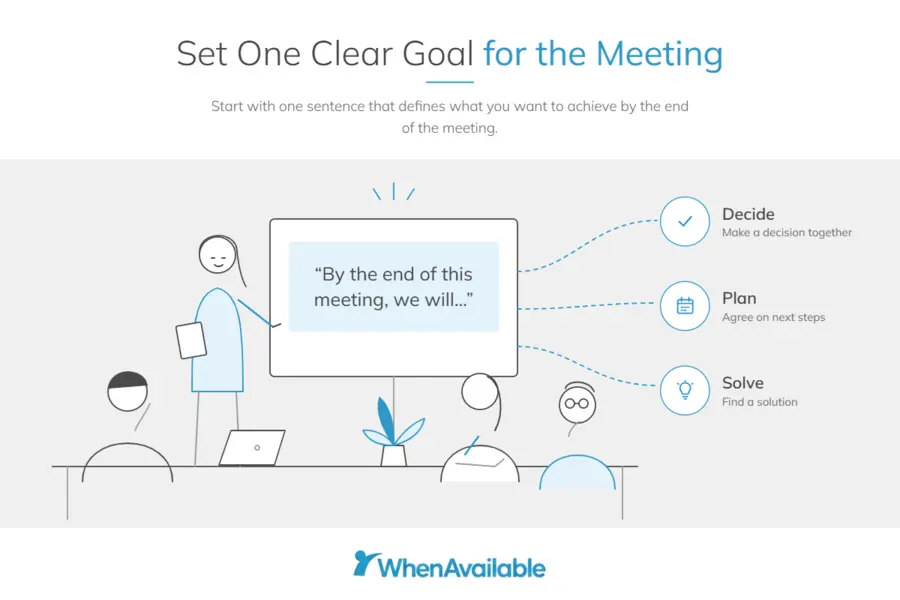
If you can't finish the sentence clearly, stop and rethink if you need to run a team meeting. You may need more information first, or the topic may be better handled via written communication.
A clear goal makes the rest of your planning easier. It helps you decide who needs to attend, how much time to book, and what belongs on the agenda. Put the goal at the top of the agenda, so people see it before the discussion starts.
2. Invite Only the Necessary People
Knowing how to run a team meeting also means knowing who actually needs to attend. Invite the people who will make the decision, contribute to the discussion, or handle the work afterward.
For the people who are attending, assign a few basic responsibilities:
- Facilitator: Keeps the conversation focused on the goal and brings quieter people into the discussion.
- Note-taker: Records the important decisions and notes who owns each action item and when it’s due.
- Timekeeper: Watches the time and gives the group a nudge when a topic is taking too long.
These don’t have to be permanent roles. Rotate them between meetings.
If you often invite the same group, save them as a guest group in WhenAvailable. In the free plan, you can create one group, but the Premium plan has no limits.
The next step in learning how to run a team meeting is to find a meeting time that works for everyone.
3. Pick a Time Everyone Can Make
Finding a meeting time shouldn’t require ten messages back and forth. Offer three to five options using an availability poll and let the group tell you which ones work.
People can respond when it’s convenient for them, and you can see the results in one place. If the most popular option doesn’t work for someone essential, go with the best alternative.
You can use WhenAvailable for the entire process when you run a team meeting:
- Create a free poll with three to five possible dates and times.
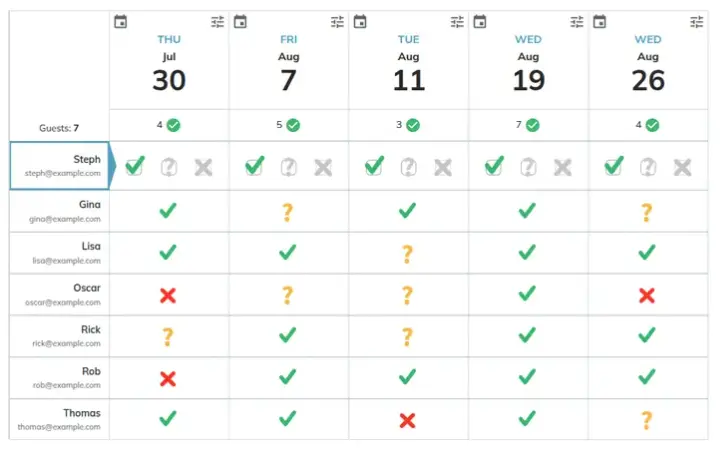
Image via WhenAvailable
- Share the poll in your group chat, or add guests by email. Guests can select their availability without creating an account.
- Check the results to see which option got the most votes.
- When one slot wins, pick the final time from the results. WhenAvailable then closes the poll and sends every invited guest a "Save the Date" notice.
Also Read:
- How to Schedule Meetings with Multiple People Easily
- Best Interview Scheduling Tools for Faster Hiring
4. Build and Share an Agenda Ahead of Time
Keep your agenda short and specific: two to four topics are usually enough.
Write the objectives as questions or in more detail, rather than using single words. For example, just saying “venue” isn’t as helpful as “Which venue should we book for the XYZ event?”
Give each item an owner and time limit, and share it with the attendees a day before the team meeting.
Here’s a simple agenda template you can use when you run a team meeting.
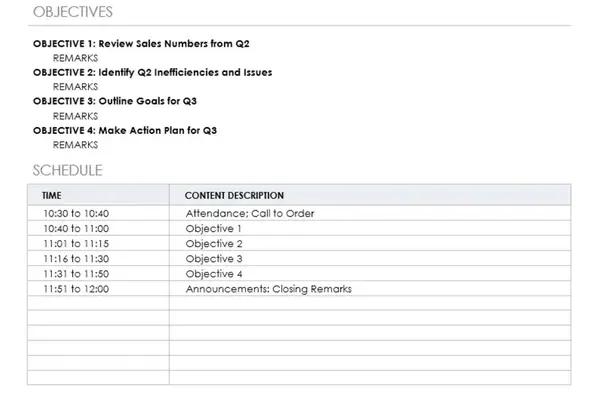
Image via Smartsheet
It’s also a good idea to ask your team if they’d like to add something to the agenda.
If you create a poll using WhenAvailable, you can add a custom question to the poll. It will help you collect suggestions while also finalizing the meeting date and time. You can choose the text-style reply format for such questions, though the tool offers five types:
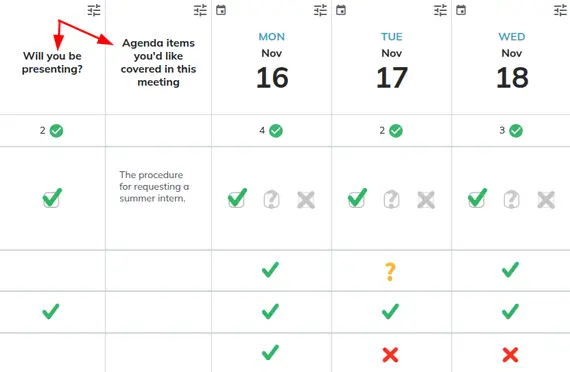
Image via WhenAvailable
Once the agenda is ready, share it about a day before you run a team meeting. That gives people time to think through things, instead of working them out during the meeting.
Keep the meeting time realistic. A routine weekly check-in can usually take 30 minutes, while a decision or planning meeting may need 60 minutes. If you can’t cover everything in that time frame, it’s better to shorten your agenda than increase the time.
5. Open on Time and Restate the Goal
When you run a team meeting, start at the scheduled time rather than waiting for everyone to arrive.
Read the main goal first, then give each person a quick chance to speak. A short check-in gets everyone involved early, including people who may not jump into the discussion on their own.
Starting on time also sets the tone for the entire meeting. When you wait for latecomers, you’re signaling that arriving late is fine. Starting and ending when promised shows everyone that time matters.
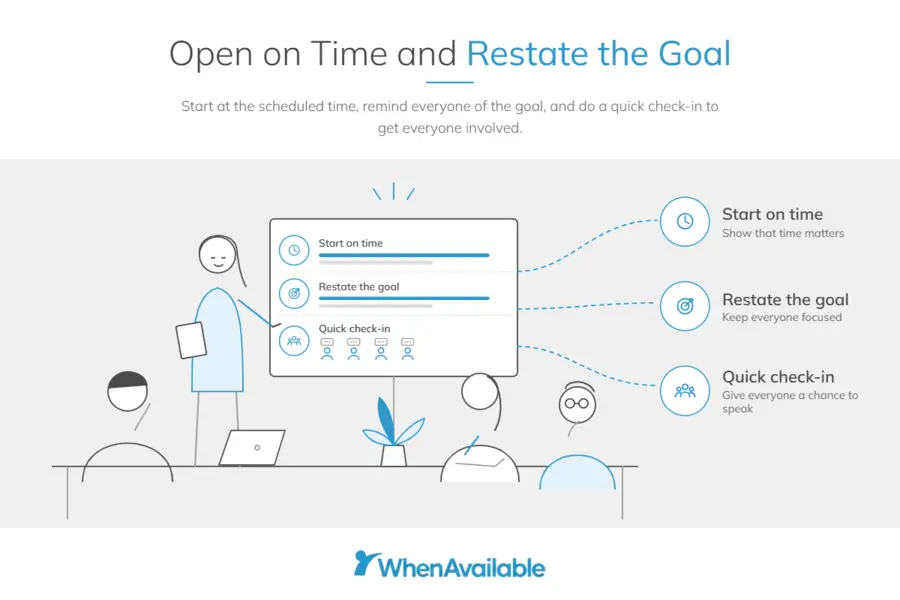
Keep the check-in simple and ask everyone to answer in one sentence. Ask questions like:
- What's one win from this week?
- What's one thing on your mind right now?
- On a scale of 1 to 5, how's your week going?
You can also set a couple of basic ground rules to run a team meeting effectively. Keep phones away unless someone needs one for the meeting, and let people finish before someone else jumps in.
The whole check-in should take about five minutes. After that, the real challenge is keeping everyone focused on the goal.
Also Read:
6. Make Sure Every Voice Is Heard
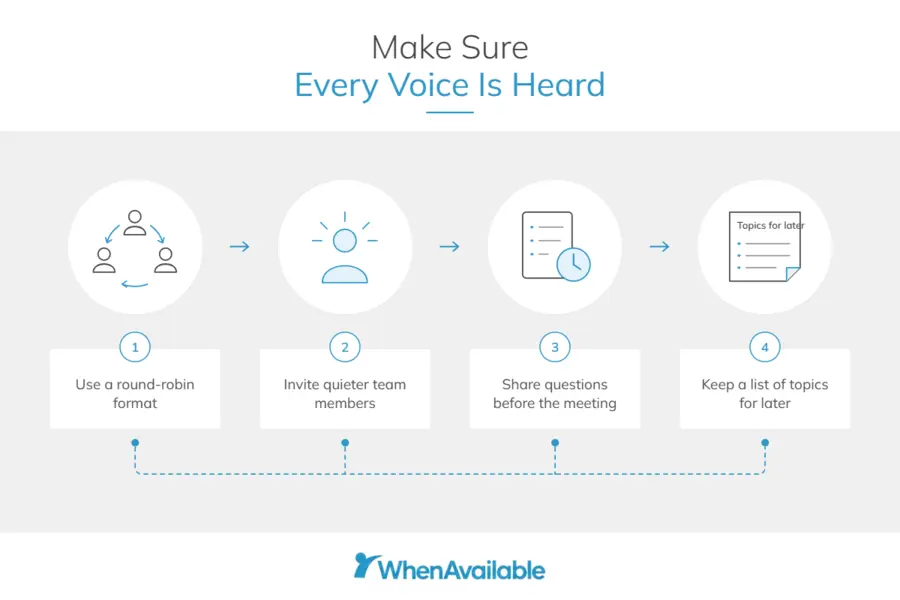
To run a team meeting well, make sure everyone gets a fair chance to contribute. A round-robin format is one simple way to do this. Ask the question and then go around the group so each person can answer.
This stops one or two people from taking over the conversation. If someone hasn’t spoken, invite them in and give them a moment to gather their thoughts.
The need for that space is backed by LSE’s 2024 report. It found that people felt their contributions weren't valued in more than a quarter of the meetings. The same study says recognizing every contribution could cut unproductive meetings by nearly a third.
But here's the catch: a round-robin can put quiet people on the spot. Sharing the questions before the meeting gives people time to prepare.
One challenge you’ll face when learning how to run a team meeting is keeping the conversation focused. If someone raises a useful but unrelated point, write it down on a list of topics to discuss later. Keep the list somewhere everyone can see it, such as a whiteboard or a shared doc.
When the conversation drifts, try something like “That’s worth discussing. Let’s come back to it after we finish this one.”
At the end, look at the list and decide what happens next: discuss the topics or keep them for another team meeting. That’s an important part of how to run a team meeting without shutting down useful ideas.
7. Close With Decisions, Owners, and Deadlines
When you run a team meeting, spend the last five minutes to make sure everyone knows what was discussed. Say the decisions out loud, then go through the action items and next steps.
For each task, mention who’s responsible for it, what needs to be done, and by when they should finish it. If several people are supposed to help, that’s fine, as long as one person owns the task.
In the meeting notes, summarize it by mentioning who does what and by when. For example, “The treasurer will book the hall for the March fundraiser by Friday.”
Alternatively, you can use a simple table format for action items. Here’s a simple template you can replicate.
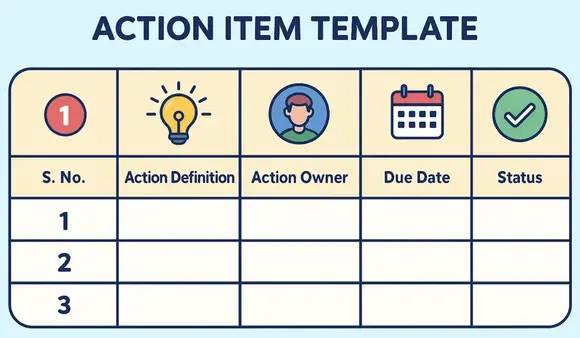
Image via PM Study Circle
You should also record how you made each decision. Did everyone agree unanimously, or did one person make the call? Or maybe everyone voted to arrive at a decision.
If you’re learning how to run a team meeting, you should learn what happens after it’s done. From creating and sharing meeting notes to following up on action items, there are still things to do.
8. Send Notes and Follow Up Before the Next Meeting
Good meetings don’t end when everyone leaves the room. Someone still needs to book the venue, check the numbers, or act on whatever decision the group agreed on.
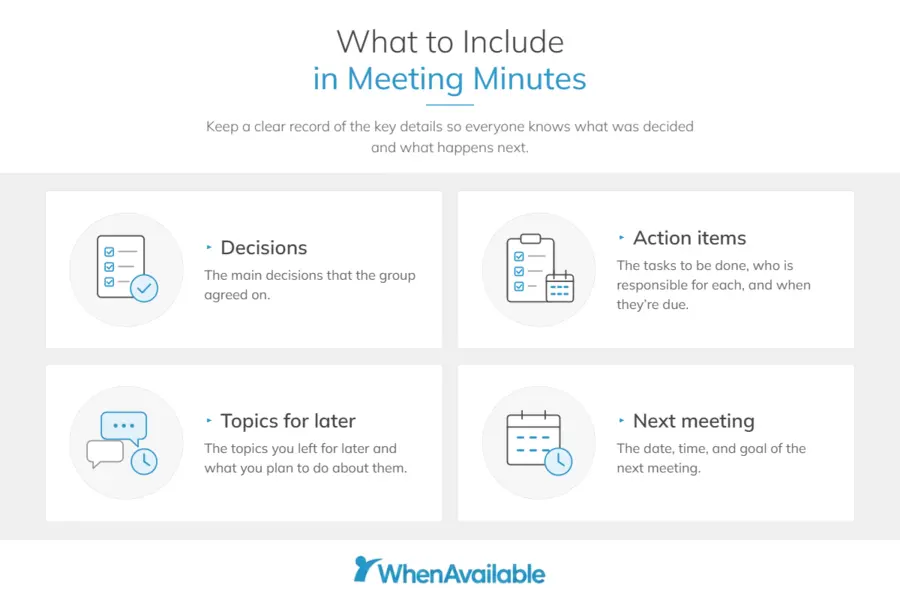
That’s why you should always create meeting minutes or notes, as they make the next steps easier to remember. Send them within a day, while the meeting is still fresh in everyone’s minds.
You don’t need to record the whole conversation, just the important details, such as:
- The decisions that the group made
- The tasks that people agreed to take on, who is responsible for each, and when they’re due
- The topics you left for later and what you plan to do about them
- The time and goal of the next meeting
Keep the notes short and to the point, so people can scan them quickly and find the most important information.
At the next meeting, check in on the tasks assigned in the previous meeting before starting the new agenda.
If you’re still learning how to run a team meeting, it’s a great idea to seek feedback after every meeting. Simply create and send a poll after the meeting and ask people to rate the meeting based on how useful it was.
|
How Do You Run a Team Meeting Effectively? Start with a clear purpose, the right people, and enough preparation. During the meeting, keep the conversation focused and give everyone a chance to speak. After the meeting, share notes and ensure everyone knows the next steps. |
Also Read:
How to Run a Team Meeting for a Small Team or Volunteer Group
To run a team meeting for a small team or volunteer group, keep the process simple and agree on how decisions will be made. Share the responsibilities, respect people’s time, and check any rules that affect how your group can make decisions.
Small teams often don't have a manager who can settle every disagreement. People may also share several responsibilities, so the person leading the meeting might also be taking notes, organizing tasks, or doing the work afterward.
Volunteer groups have another challenge: people are giving their time because they want to support the group. That makes it especially important to keep meetings useful and avoid taking more time than necessary.
What does this mean for you?
Your meeting competes with everything else people could do with a free hour. If you run a small business, you're in the majority. The SBA Office of Advocacy reported in 2026 that 99.9% of US businesses are small.
To run a productive meeting, agree on the decision-making method. Here are some options:
| Method | How it works | Best for | Watch out for |
|---|---|---|---|
| Consensus | Talk until everyone can support the choice | Direction and anything people must own | It can take a long time |
| Consent | Ask "Does anyone object?" and adjust until nobody does | Fast decisions you can revisit later | Quiet objections that go unsaid |
| Majority vote | More than half of those voting decides | Clear either-or choices | The losing side may lose interest |
| Hand it to a lead or committee | The group hands the call to named people | Small, routine or urgent choices | Unclear limits on what they can decide |
Here are some other best practices you should follow:
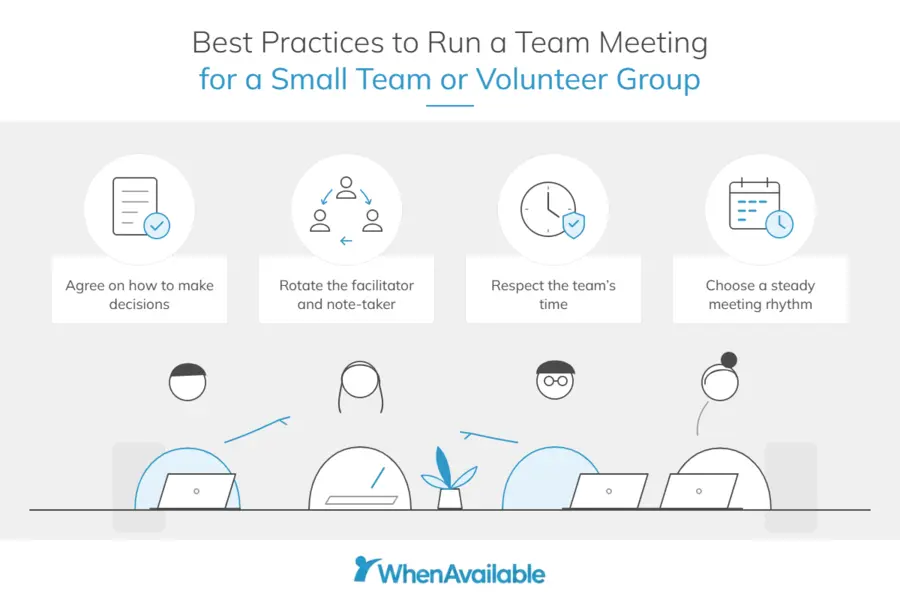
- Rotate the Facilitator and Note-Taker: Sharing the jobs keeps one organizer from burning out.
- Protect Donated Time: End when you said you would, and put routine updates in writing.
- Pick a Steady Rhythm: Meet weekly or every other week during a busy stretch, and less often when it's quiet.
The goal isn't to make small-team meetings more formal. It's to make them easier for people to participate in and easier to keep up with.
|
What Changes When You Run a Meeting for Volunteers or a Small Team? For a small team or volunteer group, only two things change: the decision rule and the clock. Settle on consensus, consent, a vote, or a lead at the first meeting. Then finish when you promised, and keep routine news in writing. |
Also Read:
How to Run a Remote or Hybrid Team Meeting
The basic meeting process stays the same, but hybrid meetings need more attention to how people participate. Make sure online attendees aren't treated like an audience while the people in the room have the real conversation.
Pick a time that works in every time zone, or rotate the awkward slot. Give remote people an equal way to speak, and put the agenda and notes in writing.
The need for this is growing. Microsoft 365 data from 2025 shows that almost one in three meetings crossed time zones. That's 35% higher than in 2021.
It can be harder to make hybrid meetings feel inclusive. LSE's 2024 research found that about 55% of remote and in-person meetings were seen as inclusive, compared with 48% of hybrid meetings.
So, what can you do?
Follow these best practices to run a team meeting with both in-person and remote team members:
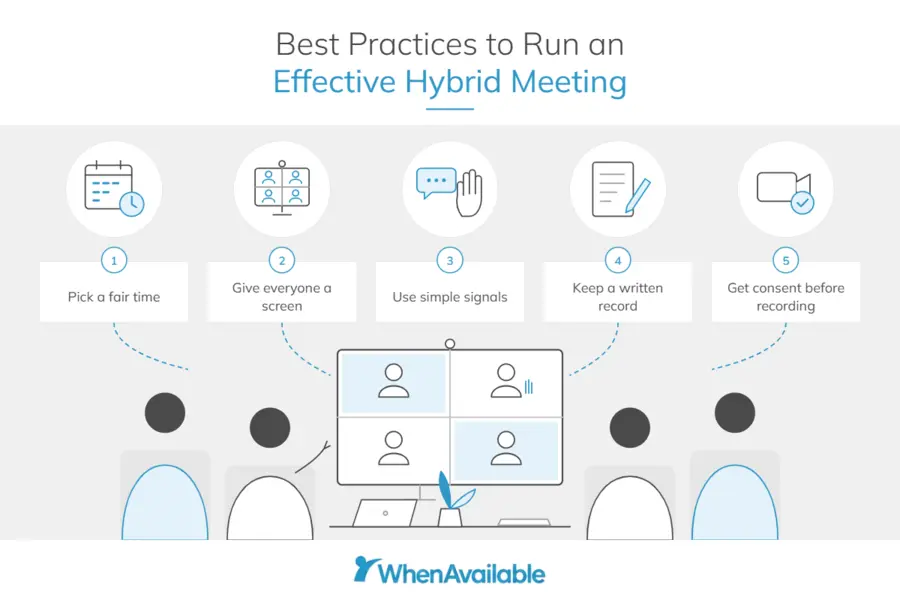
- Pick a Fair Time: If you can't, rotate the early or late slot so the same people don't always pay. WhenAvailable shows guests each option in their own time zone, and the time zone settings let them switch views.
- Give Everyone a Screen: One camera pointed at a conference table rarely works well. Remote attendees can struggle to see who's speaking or find a natural moment to join.
- Use Simple Signals: Chat and raised hands make it easier for remote attendees to get a word in. Asking them for input first can help prevent the room from dominating.
- Keep a Written Record: People who missed the call can still weigh in. For international groups, WhenAvailable's language switch shows dates and times in five languages.
- Get Consent Before Recording: Get everyone's agreement before you hit record. Recording laws differ across countries and states, so make sure you know which rules apply.
A good hybrid meeting shouldn't make people feel like they're joining from the sidelines. Clear goals, fair participation, and good notes go a long way.
|
How Do You Keep a Remote or Hybrid Meeting Fair? It comes down to two key things: choosing a fair time and making space for everyone. Don't let one group always take the inconvenient time. Give remote attendees a clear chance to speak, then share the key decisions with anyone who couldn't attend. |
Also Read:
FAQ
1. What is the best way to run a team meeting effectively?
The best way to run a team meeting is to follow these eight steps:
- Set one clear goal
- Invite only the people needed
- Poll for a time
- Share an agenda a day ahead
- Open on time
- Hear every voice
- Close with owners and deadlines
- Send notes within a day
2. What are the 5 P's of meetings?
The 5 P’s of meetings are Purpose, Participants, Preparation, Process, and Payoff. Start by deciding what the meeting needs to achieve and who needs to be involved. Give people the information they need before the meeting.
Use a clear process to keep the discussion moving. Finally, agree on the payoff, whether that's a decision, action plan, or another useful outcome.
3. What is the 40/20/40 rule for meetings?
The 40/20/40 rule is a reminder that the meeting itself is only one part of the work. Roughly 40% should happen before the meeting, 20% during it, and 40% afterward. Before the call, get clear on the goal and who needs to attend. After it, record the decisions and follow up on anything that still needs doing.
4. How long should a team meeting last?
That depends on the goal, but usually 30 to 60 minutes are enough.
Plan about 30 minutes for a routine check-in, enough for updates and one main question.
A decision or planning meeting can run up to 60 minutes.
If the agenda runs longer, cut a topic before you add time.
Treat these as starting points when learning how to run a team meeting. Adjust these numbers based on your experience and team needs.
5. What is a good opening question for a team meeting?
A good opening question is quick to answer and gets every person talking once. Ask for one win from the week, one thing on their mind, or a 1-to-5 rating of their week. Keep each answer to a sentence so the check-in fits in five minutes. Speaking early also makes it easier for quieter people to join in later.
6. How do you make team meetings more engaging?
Make every person's input count, and show them it did:
- Take turns on every main question so nobody has to fight for airtime.
- Call on quieter members by name, after giving them a moment to think.
- Rotate the facilitator and note-taker so more people shape the meeting.
- Recognizing every contribution may also cut unproductive meetings, so thank people by name when their idea gets used.
7. How often should you have team meetings?
There isn't one right meeting schedule. Meet as often as the team's work requires, then cut back when there's less to discuss.
- Active Projects: Meet weekly or every other week when work is moving quickly.
- Quieter Periods: Meet less often and handle routine updates in writing.
- One-Off Decisions: Call a meeting when a decision needs discussion, rather than adding it to the next regular meeting.
Once you find a rhythm that works, stick with it. People can then plan their work around meetings instead of constantly wondering when the next one will be.
8. How do you keep a team meeting on track?
The easiest way to keep a meeting from drifting is to decide what needs to get done before everyone joins.
- Keep the Agenda Tight: List the questions that need answers, who will lead each one, and how much time it gets.
- Keep an Eye on Time: Have someone flag topics that are taking longer than planned.
- Save Side Discussions for Later: Put unrelated ideas or questions aside and come back to them later.
And if you're running out of time, don't rush through everything. Push the least important topic to another meeting or handle it separately.
Conclusion
Learning how to run a team meeting can help you save a lot of time. The basics are simple: have a clear reason to meet, bring the right people together, and prepare everyone beforehand.
During the meeting, stick to the agenda and give people room to contribute. Keep side discussions from taking over, then end with clear actions and owners.
Remote and hybrid teams also need to think about time zones and equal participation. Keep your meeting schedule predictable, but change it when needed.
Use WhenAvailable to share an availability poll and find a time that works for everyone. If you run team meetings frequently and need an easy way to coordinate, invest in WhenAvailable’s paid plans.