How to Remove a Guest
As the poll organizer, you can remove any guest from your poll at any time (apart from yourself). You can remove a guest regardless of whether they added themselves to the poll via a shareable link or received an email invitation.
Steps to Remove a Guest
To remove a participant from your poll:
- Open your poll and view the guest list (in Table view or Votes view).
- Click on the name of the guest you want to remove to open the guest options dialog.
- Click the "Remove Guest" button in the dialog to delete the guest from your poll.
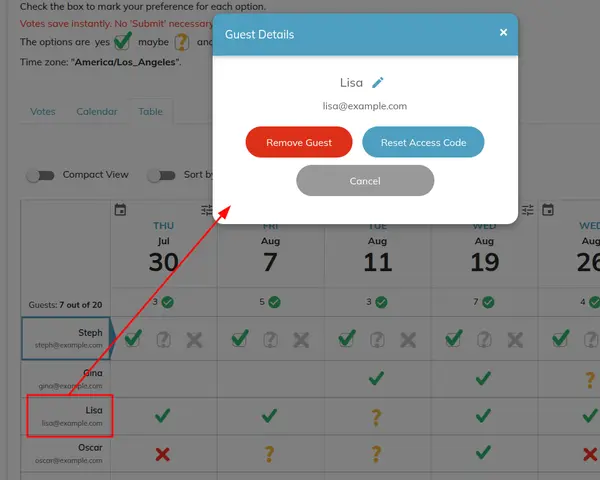
Click on the guest's name and select "Remove Guest" to delete them from your poll.
💡 Pro-Tip: Guests are not notified when they are removed from a poll.
Note: Removing a guest permanently deletes their vote entries. If the guest was invited via email, the unique link in their email invitation will no longer grant access to the poll.