Combining Date/Time Polls with Custom Questions
While WhenAvailable is built for scheduling, we know that planning an event often involves more than just picking a time. That’s why you can include custom text-based questions alongside your date and time options.
Whether you need to know who is bringing a side dish or who needs a ride, adding questions makes your poll a one-stop shop for event coordination.
How it Works: Flexible Reply Options
When you add a question to your poll, you can choose from five different reply formats to gather exactly the information you need:
- Yes, Maybe, No: Standard poll options.
- Yes, No: For binary choices.
- Yes Only: For sign-ups or volunteering.
- Number Reply: For quantifiable answers like how many guests they are bringing.
- Free Form Text: For open-ended questions like dietary restrictions.
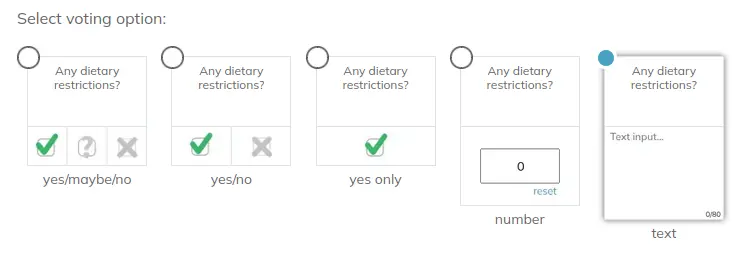
Choose the reply type that best matches the format of your question.
💡 Pro-Tip: Be sure to select the reply type that best matches the format of your question to make it easy for your guests to respond!
Examples of effective questions:
- "Can you bring a snack to share?" (Yes/No)
- "What snack are you bringing?" (Free form text)
- "Will you need a parking pass for the venue?" (Yes/No)
- "How many extra guests are you bringing?" (Number reply)
Use Cases for Text Questions
Mixing text and time allows you to gather all the data you need at once. Consider adding questions for:
- Logistics: "How many nights will you be staying at the hotel?"
- Commitments: "Can you help with the setup 30 minutes before we start?"
- Preferences: "Do you have any dietary restrictions we should know about?"
See it in Action
Below is an example of how a custom question appears to your guests within a poll:
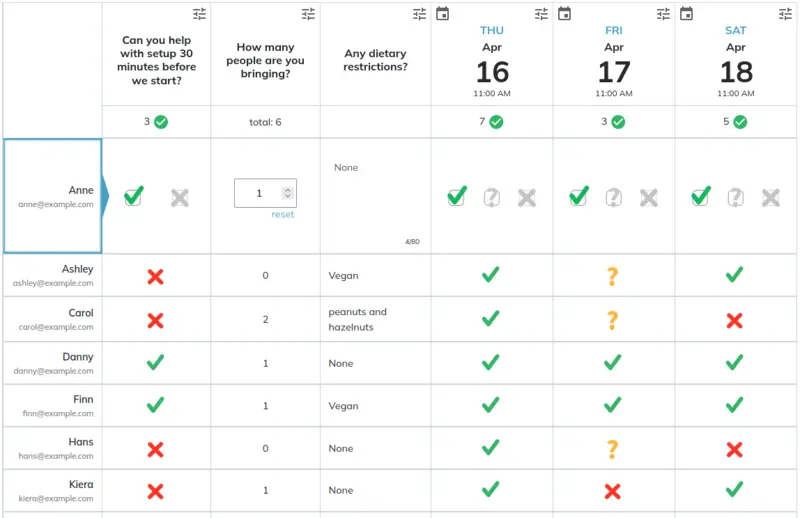
Custom questions appear alongside your date/time options for a seamless guest experience.