Confirming Dates and Notifying Your Guests
this is for premium subscribers
Once your poll results are in, the final step is letting everyone know which dates have been chosen. With our Multi-Date Confirmation feature, you can highlight the winning options and instantly notify the right people—all in one workflow.
Why use this feature?
- Targeted Communication: Send emails only to the people who said "Yes" to a specific date.
- Visual Clarity: Highlight chosen dates so they stand out to anyone viewing the poll.
- One Poll, Multiple Decisions: Confirm every viable date, not just one.
Step-by-Step Guide
-
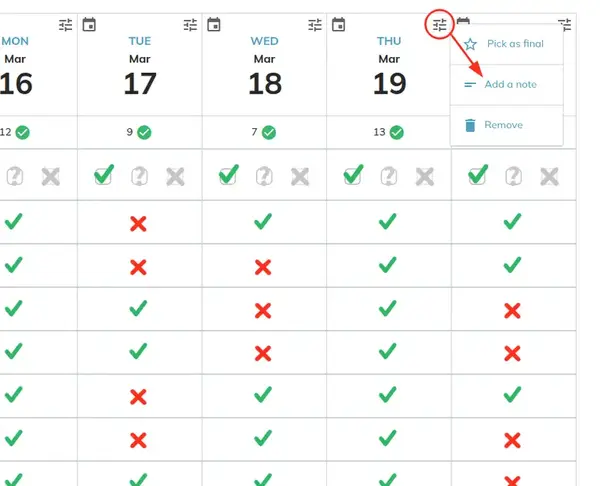
Open the Date Menu
Navigate to your poll results. For any date or time slot you wish to confirm or comment on, click the Options in the corner of that specific time slot.
-
Customize Your Notification
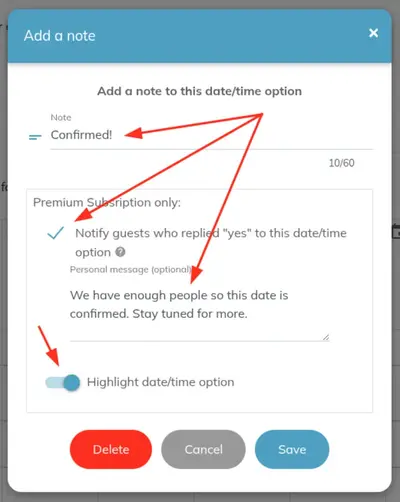
A dialog box will appear with several options to help you communicate the final plan:
- Add a Note: Write a brief update (e.g., "Meeting at the downtown office" or "Finalized!").
- Notify Guests: Check this box to trigger an automated email to everyone who responded "Yes" to this specific time.
- Personalize the Email: Add a custom message that will appear in the body of the notification email.
-
Highlight Option: Toggle the "Highlight" switch to give this date a distinct visual
border on the poll page.
-
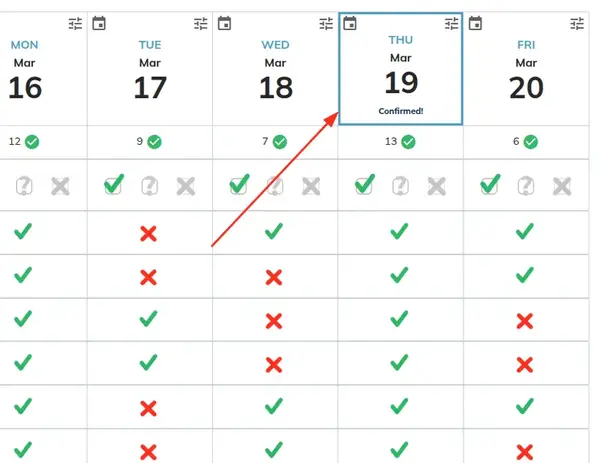
Review the Visual Highlight
Once saved, the chosen date will be clearly marked, making it easy for guests to see the final decision at a glance.
-
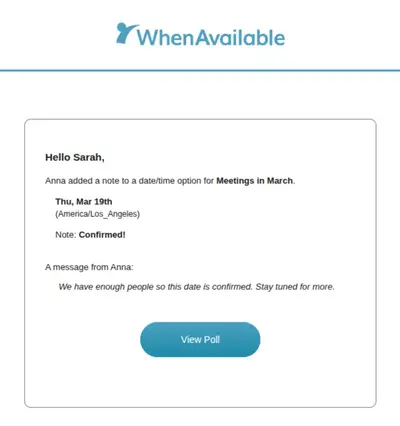
What Your Guests Receive
Your guests will receive an email containing your personal note and the specific date/time details.
Platform Availability
- Web: Fully available now.
- iOS & Android: This feature is currently in development and will be coming to our mobile apps in a future update!