Language Switch
Planning a meeting with international team members, family, or friends? WhenAvailable offers multi-language options for date and time displays so your guests feel right at home.
1. What is the Language Switch?
The language switcher allows you and your guests to view the dates and times of the poll in different languages. This includes:
- Month and day names (e.g., "Monday, July 16" in English becomes "Montag, 16. Juli" in German).
- Calendar controls and date picker popups.
- Time formatting (12-hour AM/PM vs. 24-hour display formats).
- Time zone switch toggles.
Important Note: The language switch changes dates and times only. Standard application text (such as menu items, input field labels, instructions, button text, and help pages) will remain in English.
2. Supported Languages
WhenAvailable currently supports five date/time display languages:
- EN - English
- DE - Deutsch (German)
- ES - Español (Spanish)
- IT - Italiano (Italian)
- FR - Français (French)
3. How It Works for Guests
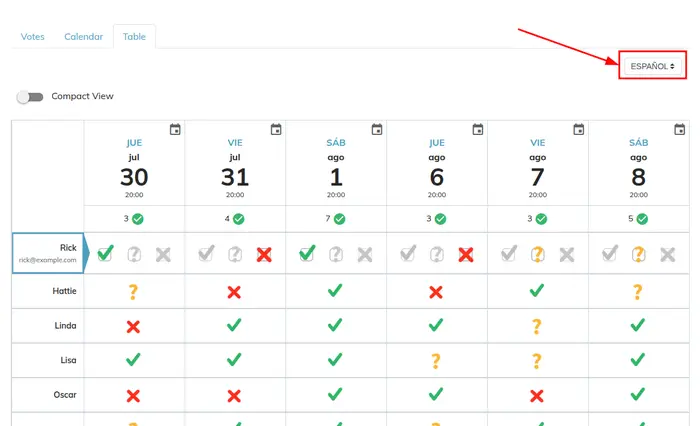
Your guests will see the poll in their own language automatically if their browser or device language matches one of the offered languages (German, Spanish, Italian, or French). If their browser is set to a language not yet supported, the dates and times will default to English.
Additionally, guests can manually select their preferred language from the dropdown menu at the top of the table when viewing the poll.
4. Organizer Settings vs. Guest Views
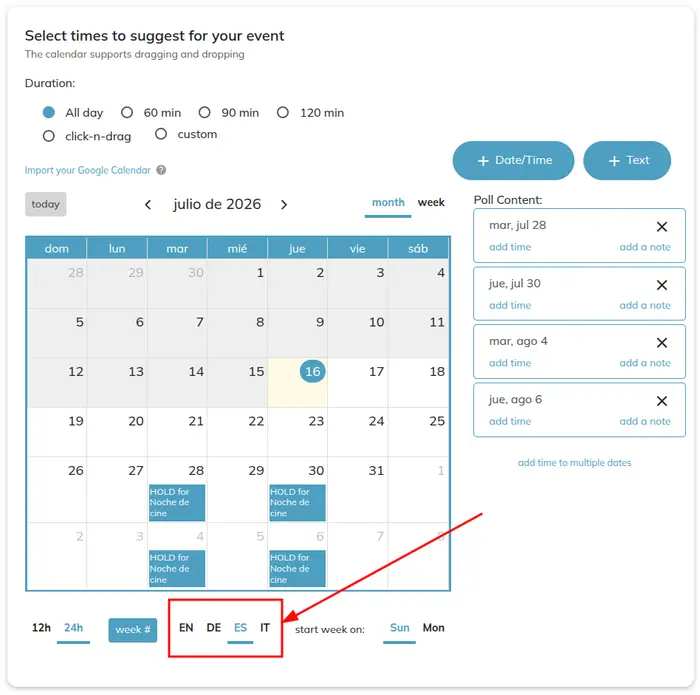
As the organizer, you can choose a language using the calendar footer buttons (EN, DE, ES, IT, FR) when setting up your poll.
However, the language chosen by the organizer does not force that language on the guest. A guest's initial language is determined by their own browser's settings or their personal saved preferences. This ensures that every guest interacts with the dates and times in the way that is most comfortable and natural for them.
5. Email Notifications
Please note that all automated system email templates (such as poll invitations, host updates, and reminders) will always be sent in English, regardless of any language preference chosen on the site.
Ready to try it? You can change your language at any time during poll creation or directly on the reply page of any active poll!