
MAY 11 2026 - 15 MIN READ
Listen to this blog post as an AI podcast
How to Schedule Meetings with Multiple People Easily in 2026
Table of Contents
To schedule meetings with multiple people without the back-and-forth, you need a simple system. Limit the invite list to essential attendees, share a scheduling poll with a range of time slots, let invitees mark their availability, and send the calendar invite once a consensus on timing is reached.
Learning how to schedule meetings with multiple people can help you make things easier for yourself.
In this post, you’ll find a step-by-step method, a breakdown of the best tools, and practical tips to help you schedule meetings with multiple people faster every time.
Quick Summary
To schedule meetings with multiple people, you need a good scheduling tool like WhenAvailable, which lets you find the best time and avoid scheduling conflicts. The steps involved are creating a list of invitees, offering time slots, and letting people choose via a poll.
Why Is Scheduling Meetings with Multiple People So Hard?
Scheduling meetings with multiple people is rarely as quick as it should be.
You send a message to your group asking when everyone’s free. One person suggests Monday. Another can’t do Monday. A third doesn’t reply for two days. Suddenly, a 30-minute meeting has taken a week to organize.
The more people you involve, the more calendars you’re working around. Finding a single time slot that works for everyone gets harder with each additional person.
Here’s where the process tends to break down.
-
Conflicting Schedules Across Time Zones: When your group is spread across different cities or countries, a time that works in one location often cuts into someone else’s workday. The bigger the geographic spread, the narrower the window of overlapping availability.
-
Slow Responses From Participants: Not everyone checks their messages at the same pace. One non-responsive member can hold up the entire team meeting scheduling process for days.
-
Reply-All Email Chains That Go Nowhere: Coordinating availability over email often turns into a chaotic thread. Everyone’s talking, but nobody’s actually agreeing on anything.
-
Last-Minute Cancellations: If someone drops out close to the agreed time, the group will have to start over. What felt like a done deal suddenly isn’t.
These delays and disconnects eat into a significant chunk of your week. Research shows that 43% of workers spend three or more hours every week just scheduling or organizing meetings.
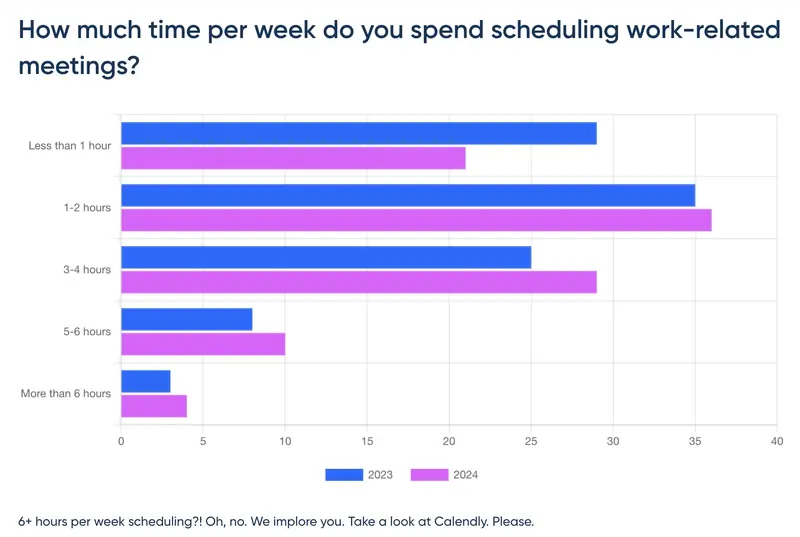
Image via Calendly
The good news is that learning how to schedule meetings with multiple people gets a lot easier when you follow a clear process. The next section walks you through exactly that.
How to Schedule Meetings with Multiple People
There’s no single easy trick for learning how to schedule meetings with multiple people. What works is having a repeatable process you can follow every time. Here are five steps to help you schedule meetings with multiple people without the usual headache.
Step 1: Decide Who Actually Needs to Be There
Before you open your calendar or send a single message, get clear on your invitee list. Remember that every extra person you add makes the scheduling process longer. Keep the list to essential attendees only.
If someone can catch up through notes or a recording, they don’t need a live slot. Industry data shows that meetings with eight or more attendees are at a higher risk of being unproductive, so keeping numbers tight benefits everyone.
Step 2: Offer Multiple Time Slots
When you schedule meetings with multiple people, proposing one specific time rarely works on the first try.
Instead, share a range of options over two or three days. This gives invitees the flexibility to pick what works for them without back-and-forth.
It also accounts for the fact that people have different schedules and need flexibility to choose a time that works for them.
Keep time zones in mind from the start. For instance, a 9 AM start in Boston means a 6 AM wake-up call in Los Angeles.
Step 3: Use a Scheduling Poll
A scheduling poll is the most efficient way to schedule meetings with multiple people. The host shares a link with options; invitees mark their available time slots, and the tool automatically surfaces the best overlap.
Tools like WhenAvailable make this easy. Participants don’t need an account — they just open the link and mark their availability. Once responses are in, you can see at a glance which time works for the most people.
Step 4: Send the Calendar Invite Right Away
When you schedule meetings with multiple people, you should send the calendar invite as soon as you finalize a meeting time. The longer you wait, the more likely someone is to double-book that slot.
Include a short agenda in the invite so attendees know what to expect and come prepared. Also, set an automated reminder for 24 hours before the meeting. Most no-shows happen because people forget, not because they didn’t want to attend.
Step 5: Confirm the Day Before
Send a brief confirmation message the day before the group meeting. A short note in the group chat or a reply to the calendar invite is enough.
Ask invitees to flag any last-minute scheduling conflicts at this stage rather than five minutes before start time.
If the tool you use to schedule meetings with multiple people has an automated reminder feature, use it. It’s just one less thing on your plate on the day.
Also Read:
What Are the Best Tools to Schedule Meetings with Multiple People?
The right group scheduling tool depends on your group size, how often you organize these meetings, and how much setup you’re willing to do.
A free scheduling tool that works well for a casual friend group may not cut it for setting up recurring board meetings. Anyone looking to schedule meetings with multiple people more efficiently will find a solid option in the list below.
1. WhenAvailable
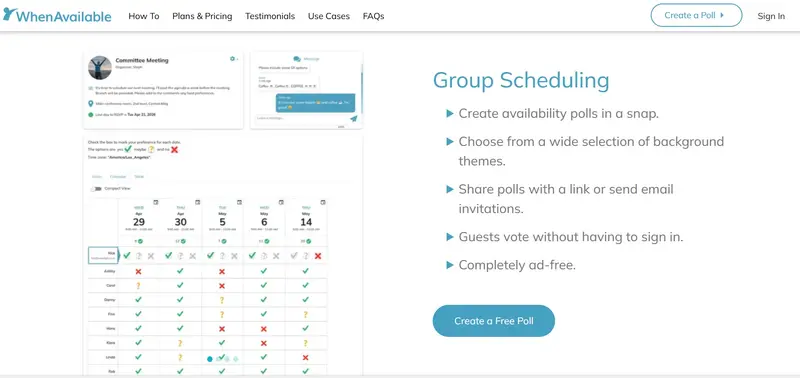
Image via WhenAvailable
WhenAvailable is a free group scheduling tool built specifically to find the best meeting time for multiple people. The host creates a poll, shares a link, and invitees mark their availability. It has a built-in chat feature making it easy to keep all the communications in one place.
Key Features
- Works for a wide range of events including board meetings, book clubs, family reunions, and other get-togethers
- Supports both time-based availability polling and text-based questions, giving the host more flexibility in how they gather input
- Guests can be invited either via email directly from the platform or a shareable link
- Solid time zone support, so works seamlessly across the globe.
Pros
- The free plan includes email invitations
- Very easy to use interface
- Always ad-free
Cons
- Fewer advanced features compared to paid alternatives
- May not suit larger organizations
Pricing
- Basic: Free unlimited basic polls for up to 20 guests
- OneTime: $10 per premium poll
- Premium: $38 per year for unlimited premium polls
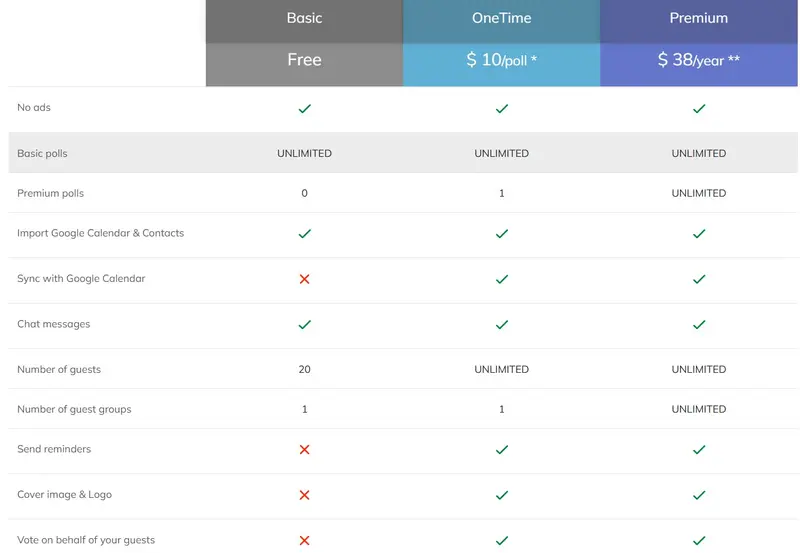
Image via WhenAvailable
Best for: Small businesses, individuals, and anyone who needs to schedule meetings with multiple people without a big budget or a complex setup.
2. Doodle

Image via Doodle
Doodle is a popular scheduling poll tool that’s been widely used in professional settings for years. It helps groups find a meeting time by letting participants vote on options the host puts forward.
Key Features
- Automated reminders available on paid plans
- Calendar integrations with Google Calendar, Outlook, and iCal
- Round robin scheduling is available on higher-tier plans
- Option to lock time slots once a decision has been reached
Pros
- Its widespread familiarity means many invitees already know how to use it
- Strong calendar integrations make it a practical fit for teams working within Google or Microsoft ecosystems
Cons
- The free plan is ad-supported, which can make the experience feel cluttered
- Several key features are only available with paid plans
Pricing
- Free plan:
- Pro: $14.95/month
- Team: $19.95/user/month
- Enterprise: Custom quote
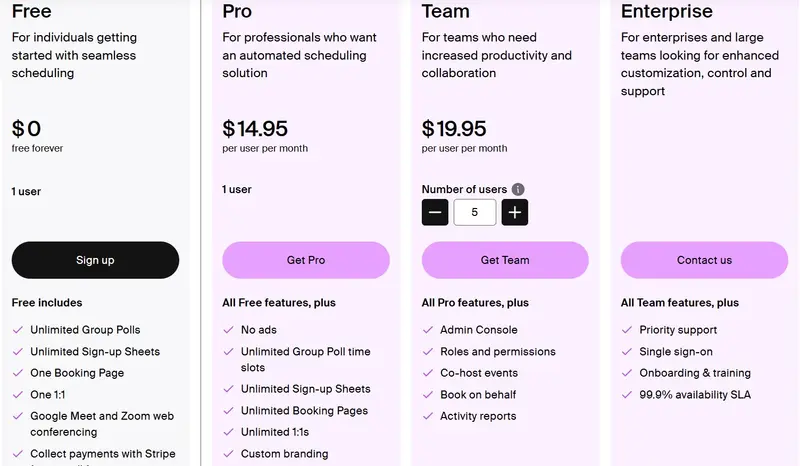
Image via Doodle
Best for: Professionals who regularly schedule meetings with multiple people and use Google or Outlook calendars.
Also Read:
- WhenAvailable vs Doodle: Which One is Better for You?
- Doodle Alternatives: Find Your Perfect Scheduling Tool
3. Zoom Scheduler
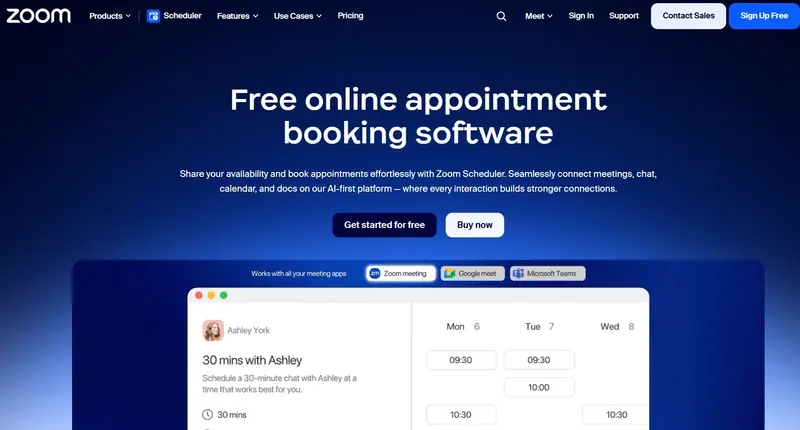
Image via Zoom Scheduler
Zoom Scheduler is a scheduling tool built into the Zoom ecosystem. It lets users share their availability and book meetings through a dedicated booking page.
Key Features
- Sends automated confirmations to all parties as soon as a meeting is booked
- Connects with Google Calendar, Microsoft 365, and Apple iCloud
- Offers one-off scheduling links for single-use bookings without exposing your full calendar
- Provides AI-powered meeting summaries and follow-ups through Zoom AI Companion on eligible plans
Pros
- For existing Zoom users, the setup is minimal
- The free plan includes unlimited availability polls
Cons
- The free tier limits users to one active booking page and one connected calendar
- Less suited for participants who aren’t Zoom users
Pricing
- Basic: Free plan
- Scheduler: $5.99/month
- Business: $21.99/month
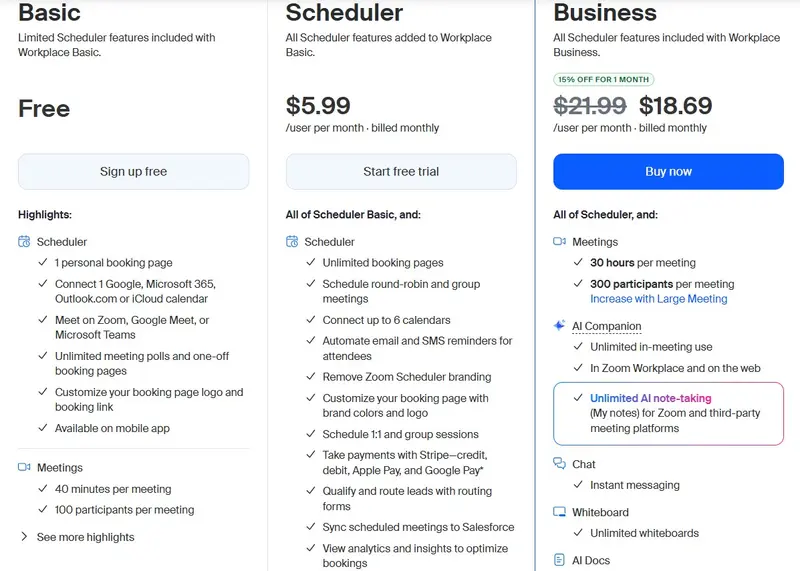
Image via Zoom Scheduler
Best for: Zoom users who want a simple way to schedule meetings with multiple people without switching to a new platform.
4. LettuceMeet
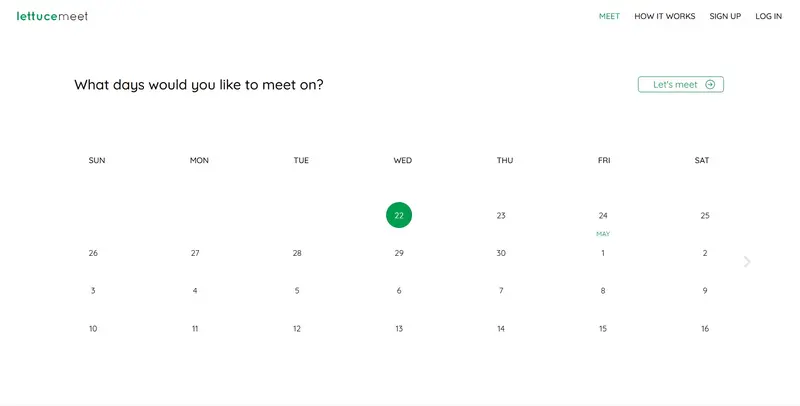
Image via LettuceMeet
LettuceMeet is a lightweight group scheduling tool built around a clean, modern availability grid. Participants mark their availability on a shared grid, and the host determines the best time based on the overlap.
Key Features
- Simple link-based sharing with no account required for the organizer or participants
- Option to mark tentative availability alongside confirmed free time
- Designed to remove unnecessary steps between setup and collecting responses
Pros
- Compared to similar tools like When2Meet, LettuceMeet is considered more user-friendly on mobile devices.
- Lightweight and fast, with minimal steps between creating a poll and receiving responses
Cons
- No reminders, calendar sync, or recurring meeting support
- Less suited for professional or recurring meetings where organizers need more control
Pricing
- Free: no paid plans currently listed
Best for: Small, informal groups who want a cleaner scheduling experience without needing advanced features.
Also Read:
- How to Start an Online Coaching Business and Attract Clients
- How to Host a Book Club Meeting Successfully in Easy Steps
5. Rallly
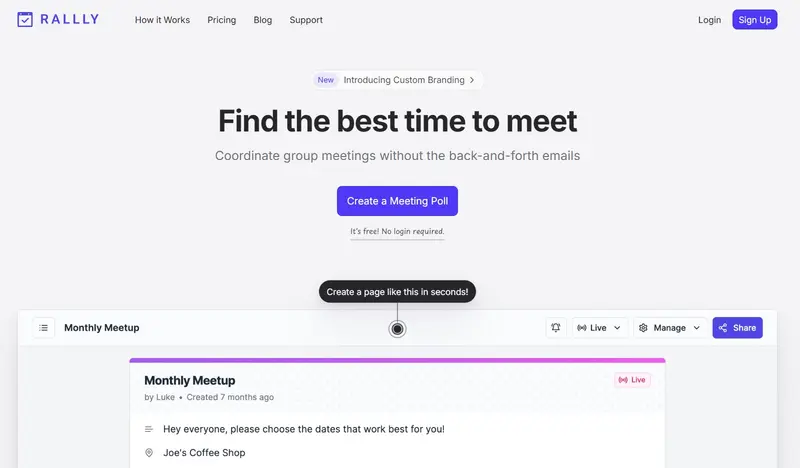
Image via Rallly
Rallly is an open-source group scheduling tool where the host creates a poll, shares it with participants, and collects votes on the best meeting time. It positions itself as a straightforward, no-account-required option for users who want simplicity and transparency in their tools.
Key Features
- A vote-based poll format where participants can select preferred time options
- Comment section on each poll so invitees can leave notes alongside their votes
- Option for the host to create an account to manage and track multiple polls
- Clean, distraction-free interface with no ads across all plans
Pros
- Open-source and always free for personal use
- The comment feature gives participants a way to flag preferences or conflicts without needing a separate message thread
Cons
- No native calendar sync with Google or Outlook
- No automated reminders or recurring event management for hosts who need more control over the follow-up process
Pricing
- Hobby: Free
- Pro: $7/month
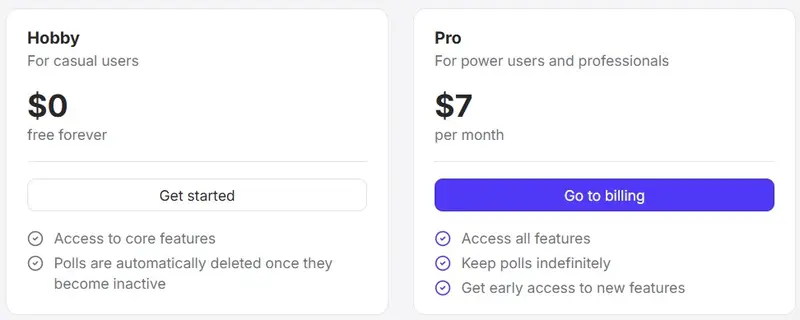
Image via Rally
Best for: Users who want a clean, ad-free scheduling poll tool and value transparency in the software they use.
What are Some Tips for Scheduling Group Meetings
Learning how to schedule meetings with multiple people is one thing, but cutting the time it takes to do it is another. These six tips will help you run a tighter group meeting process every time.
- Set a Response Deadline: Don’t leave your scheduling poll open indefinitely. Set a 48-hour cutoff and let invitees know upfront when it closes. People respond faster when there’s a deadline, which prevents a single late reply from holding up the entire group.
- Offer Fewer Time Slots: It may seem counterintuitive, but too many options slow decision-making. Stick to four to six time slots you’d genuinely be happy with and move forward from there. Fewer choices consistently lead to faster responses across the board.
- Account for Time Zones: If your group spans multiple regions, label each option in at least two time zones directly in the poll. Some group meeting scheduling tools handle this automatically, removing another manual step from your setup. Getting this right early prevents confusion on the day of the meeting.
- Assign Clear Ownership: Group scheduling falls apart when everyone assumes someone else is handling it. Designate one person to create the poll, prioritize follow-ups, and send the confirmed invite. This is especially important when you schedule recurring meetings with multiple people, such as book clubs or monthly team meetings.
- Create a Recurring Schedule: If you meet the same group regularly, a frictionless scheduling assistant approach is to set a fixed recurring slot rather than starting from scratch each time. Only revisit it when someone has a genuine conflict. This significantly reduces your team’s scheduling overhead over time.
- Follow Up Once: If invitees haven’t responded to your group meeting poll, one follow-up message is enough. Send it 24 hours before your response deadline and leave it at that. More than one nudge rarely speeds things up and often just annoys people.
Also Read:
FAQ
1. What is the easiest way to schedule a meeting with multiple people?
A scheduling poll is the easiest method. Share a link, let invitees mark their available time slots, and the tool shows the best overlap. Tools like WhenAvailable make this quick and free for everyone involved.
2. How do you schedule a group meeting without endless back-and-forth?
Use a group scheduling tool instead of email chains. Set a response deadline, offer a few time slot options, and let the tool collect responses. The scheduling poll format is built specifically to solve this problem.
3. What is the best free tool to schedule meetings with a group?
WhenAvailable is a strong, free scheduling tool — no participant account is needed, and it’s simple to set up. LettuceMeet, Doodle, and Rallly are also solid options.
4. How many people are too many for a group meeting?
Research shows meetings with eight or more attendees are at a higher risk of being unproductive. Keep the group to essential members only.
5. How do you handle different time zones when scheduling a group meeting?
A good way to schedule meetings with multiple people across time zones is to use a tool that displays times automatically in each participant’s local time zone.
Final Word: How to Schedule Meetings with Multiple People
Learning how to schedule meetings with multiple people gets easier once you have a system in place. Narrow your invite list, share a range of time slots, use a scheduling poll, and send the confirmed invite right away. That’s the whole process.
There are simple steps you can take to schedule meetings with multiple people. Stick to the process to avoid back-and-forth.
The next time you need to schedule meetings with multiple people, skip the group chat and start with a dedicated tool.
WhenAvailable lets you set up a scheduling poll in minutes, with no account required from your participants. Start free with WhenAvailable and see how much time it saves.