
APRIL 8 2026 - 15 MIN READ
Listen to this blog post as an AI podcast
WhenAvailable vs Doodle: Which One is Better for You?
Table of Contents
Choosing between WhenAvailable vs Doodle depends on whether you want a lean or heavy-weight scheduling tool.
WhenAvailable is a great choice if you want a quick, free, and straightforward way to schedule group meetings. It’s better for custom meeting polls when trying to find the ideal time for reunions, get-togethers, events, meetings, and more.
Doodle, on the other hand, excels at quick, one-off group polls. It’s also ideal if you want to connect meetings to your professional calendar and other work tools.
So, which tool fits your workflow?
In this guide, we’ll break down the key features, pros, cons, and pricing of both tools so you can choose the best option for yourself.
WhenAvailable vs Doodle: The Summary Box
| WhenAvailable | Doodle |
|---|---|

|

|
| WhenAvailable is a scheduling tool designed to simplify group meeting coordination. It allows you to create quick availability polls where guests can vote on dates and times without creating an account. It’s an ad-free, simple solution for anyone organizing social events, board meetings, or casual get-togethers. WhenAvailable is ideal for users who want a no-fuss way to get a group of people on the same page quickly. | Doodle is a scheduling tool that handles both group polls and professional one-on-one bookings. It helps you coordinate team meetings through calendar integrations and booking pages. While the free version includes ads, the paid tiers offer advanced features like branding and automatic reminders. Doodle is ideal for professionals and businesses that want to connect their scheduling process to tools like Google Calendar. |
WhenAvailable vs Doodle: Product Ratings
| WhenAvailable | Doodle | |
|---|---|---|
| Overall | 4.5 | 4 |
| Support | 4 | 4 |
| Features | 4 | 5 |
| User-Friendliness | 5 | 4 |
| Value for Money | 5 | 3 |
Pros and Cons: WhenAvailable
| Pros | Cons |
|---|---|
| 👍 You can create unlimited basic polls with up to 20 guests in the free plan | 👎 The free plan doesn’t sync with Google Calendar |
| 👍 It’s ad-free across all plans | 👎 Lacks advanced meeting scheduling features like a booking page, payment processing, and round-robin meetings |
| 👍 Doesn’t require an account to participate in polls | |
| 👍 Offers an anonymous voting option if you’re handling sensitive meeting details |
Pros and Cons: Doodle
| Pros | Cons |
|---|---|
| 👍 Connects with Google Calendar and Outlook to sync schedules | 👎 The free version has ads and limited features |
| 👍 Supports versatile meeting types, such as round-robin meetings, group polls, and one-on-one meetings | 👎 Paid plans start at a per-user cost that may not suit small businesses |
| 👍 Integrates with video conferencing tools like Zoom | 👎 Can feel like overkill for users looking for simple group meeting scheduler apps |
| 👍 Offers AI-generated meeting descriptions |
Pricing Details: WhenAvailable
| Plan | Cost |
|---|---|
| Basic | $0 |
| OneTime | $10/poll |
| Premium | $38/year |
Pricing Details: Doodle
| Plan | Cost (Per Month) |
|---|---|
| Free | $0 |
| Pro | $14.95 per user |
| Team | $19.95 per user |
| Enterprise | Contact support |
Verdict: While Doodle offers calendar sync and custom reminders, its ad-heavy free plan and paid plans can be a bit much for a small business. Meanwhile, WhenAvailable is a no-fuss solution for group scheduling. It has no ads, and you can start for free, so it offers incredible value for individuals.
Who is it For?
| WhenAvailable | Doodle |
|---|---|
| ✔️ Small business owners | ✔️ Marketing professionals and sales teams |
| ✔️ Event organizers | ✔️ Recruiters and HR |
| ✔️ Freelancers looking for a free tool | ✔️ Enterprises |
| ✔️ Anyone who needs to schedule book club meetings, get-togethers, reunions, or casual group events | ✔️ Social event organizers |
WhenAvailable vs Doodle: Key Features Comparison
WhenAvailable
Doodle
Ad-Free Environment (on Free Plan)
✅
❌
User
Experience
No-Account Voting
✅
✅
Dedicated Mobile App
✅
❌
Scheduling Features
Unlimited polls
✅
✅
Voting Deadlines
✅
✅
Custom Poll Questions
✅
✅
Time Zone Detection
✅
✅
Automatic Reminders
✅
✅
Custom Branding
✅
✅
Chat Messages
✅
❌
Integrations
Google Calendar
✅
✅
Video Conference
❌
✅
Online Payments
❌
✅
API Integration
✅
❌
| WhenAvailable | Doodle | ||
|---|---|---|---|
| Ad-Free Environment (on Free Plan) | ✅ | ❌ | |
| User Experience | No-Account Voting | ✅ | ✅ |
| Dedicated Mobile App | ✅ | ❌ | |
| Scheduling Features | Unlimited polls | ✅ | ✅ |
| Voting Deadlines | ✅ | ✅ | |
| Custom Poll Questions | ✅ | ✅ | |
| Time Zone Detection | ✅ | ✅ | |
| Automatic Reminders | ✅ | ✅ | |
| Custom Branding | ✅ | ✅ | |
| Chat Messages | ✅ | ❌ | |
| Integrations | Google Calendar | ✅ | ✅ |
| Video Conference | ❌ | ✅ | |
| Online Payments | ❌ | ✅ | |
| API Integration | ✅ | ❌ |
Verdict: Choose WhenAvailable if you run a small business and want an ad-free booking tool with a free plan. Choose Doodle if you need to manage multiple calendars for a larger team.
Detailed Review: WhenAvailable
In this section of our WhenAvailable vs Doodle comparison, we’ll review the former’s features in detail.
User Experience
WhenAvailable offers a distraction-free scheduling experience. Here are some of its key features:
- Ad-Free Environment: Unlike Doodle, WhenAvailable’s free and paid plans give you a complete ad-free experience
- No-Account Voting: Participants can submit availability without creating an account
- Mobile App: You can manage your scheduling process on the go
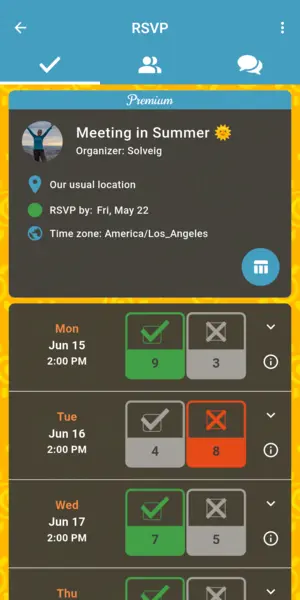
Image via WhenAvailable
When comparing WhenAvailable vs Doodle, we found that WhenAvailable’s strength lies in how little it asks of you. There are no ads, forced signups, or paywalls standing between you and a meeting booking.
Also Read:
Scheduling Features
If you compare WhenAvailable vs Doodle, you’ll see a difference in how each tool handles your time. Both help with event scheduling and meetings, but offer different features. Here’s what you get with WhenAvailable:
- Unlimited Polls: Its generous free plan allows you to create many basic polls, including group scheduling links
- Temporary Scheduling: It allows you to set polls that expire after a certain period, keeping your meeting details private
- Custom Poll Questions: You can ask guests for extra details, like dietary needs or special requests
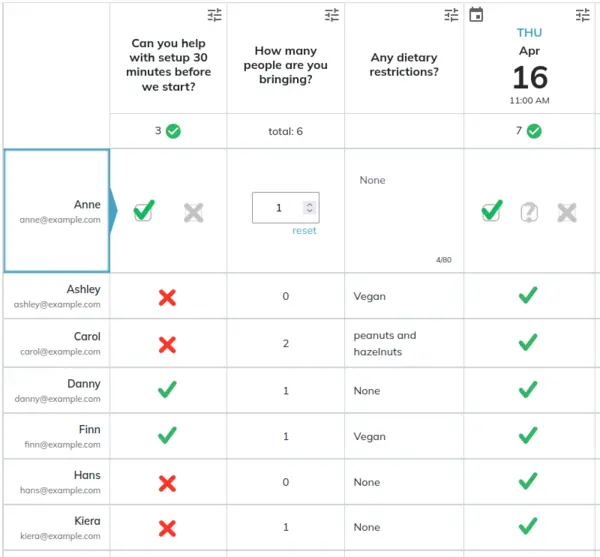
Image via WhenAvailable
- Time Zone Detection: It automatically adjusts the proposed time for participants in different locations
- Custom Branding: This lets you add cover images to polls, giving your business a professional look
- Chat Messages: Participants can communicate directly within the poll, so all meeting-related conversations stay in one place
In this WhenAvailable vs Doodle comparison, WhenAvailable delivers some advanced features for free. These include background themes and chats. Doodle, on the other hand, locks most essential features behind expensive paywalls.
Integrations
This meeting scheduler app focuses on connections that matter most to small business owners. They include:
- Google Calendar Sync: You can connect your own calendar to automatically import events and avoid conflicts
- API Integration: It allows you to put links on your website to initiate pre-filled polls, so clients can pick a time based on your business hours

Image via WhenAvailable
When you look at WhenAvailable vs Doodle, WhenAvailable doesn’t try to fit in a lot of third-party tools. It keeps things accessible and streamlined to tools you already use, such as Google Calendar. Doodle offers similar integrations, but they’re usually more complex and restricted to the more expensive paid plans.
Also Read:
Detailed Review: Doodle
Next, for our WhenAvailable vs Doodle comparison, let’s review the latter’s key features.
User Experience
Doodle offers a familiar scheduling experience similar to that of WhenAvailable. For instance, participants can vote without an account.
However, the ad-free feature is strictly a premium feature. So, users on the free plan will have to deal with ads when managing polls.
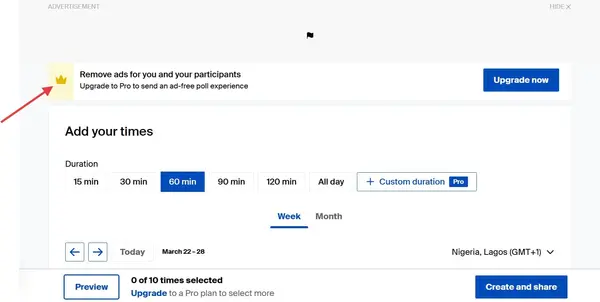
Image via Doodle
Following a shift in mid 2025, Doodle paused its mobile app. This means mobile users are back to relying on the browser version.
Comparing WhenAvailable vs Doodle, WhenAvailable is better if you want a mobile-ready, ad-free tool for scheduling meetings.
Scheduling Features
Much like WhenAvailable, Doodle offers all the essential meeting scheduler tools. You can create unlimited polls and schedule team and one-on-one meetings.
The meeting scheduler automatically detects the time zone for global clients and allows you to set up custom poll questions.
However, useful features like automated reminders, custom branding, and booking forms are only available in the paid plans. It’s also worth noting that Doodle doesn’t have a built-in chat messaging feature for real-time discussion within your poll.
When comparing WhenAvailable vs Doodle, WhenAvailable is the stronger choice if you want basic scheduling features and customization without a high price tag.
Also Read:
- Doodle Alternatives: Find Your Perfect Scheduling Tool
- How to Host a Book Club Meeting Successfully in Easy Steps
Integrations
Doodle connects with some professional tools, though many of them are reserved for its paid plans:
- Multiple Calendars: You can sync Google Calendar, iCloud, and Microsoft Office 365
- Video Conferencing: It automatically generates links for virtual meetings through
platforms like Zoom, Google Meet, and Microsoft Teams
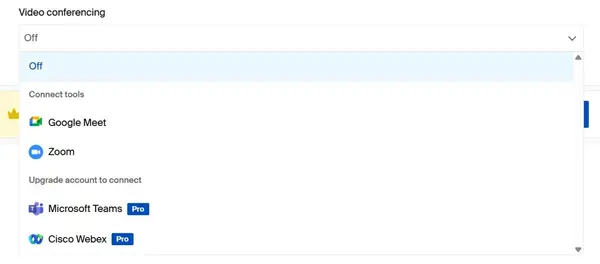
Image via Doodle
- Online Payments: You can process payments using Stripe when participants select meeting slots
Doodle’s integration is great for an enterprise business setup seeking complex scheduling. However, comparing WhenAvailable vs Doodle, we found WhenAvailable to be the better choice for small business owners who want a seamless way to manage their schedule.
WhenAvailable Pricing
WhenAvailable offers the following plans:
- Basic: $0/month
- OneTime: $10/poll
- Premium: $38/year
With WhenAvailable’s OneTime plan, you can upgrade a basic poll in the free plan to allow unlimited guests. In this WhenAvailable vs Doodle review, WhenAvailable wins for its affordability.
Doodle Pricing
The pricing options for the Doodle scheduling tool are:
- Free: $0/month
- Pro: $14.95 per user per month
- Team: $19.95 per user per month
- Enterprise: Contact support
Comparing WhenAvailable vs Doodle, WhenAvailable offers advanced features at a budget-friendly price. This makes it the better choice for small businesses and individuals.
WhenAvailable vs Doodle: What Do Customers Say About Them?
| WhenAvailable | Doodle |
|---|---|
|
“...It is an outstanding piece of software which I heartily recommend to
anyone
who has to try to organise events for a club, society or similar
grouping.”
Nicholas, UK |
“Great way to collaborate and find times that work for a large group of
busy
executives.”
Ashley T., Director of Finance and Operations |
Also Read:
FAQ
1. Is there an app better than Doodle?
WhenAvailable is a better alternative to Doodle if you want a completely free, user-friendly scheduling tool. It lets you create scheduling polls and collect availability preferences without ads.
2. Which is better, WhenAvailable vs Doodle?
Selecting between WhenAvailable vs Doodle depends on your needs. WhenAvailable is a no-fuss option for scheduling informal events or meetings, while Doodle is better suited for business use.
3. What is the best free scheduling app?
WhenAvailable is one of the best free scheduling apps available. It offers quick setup, flexible availability preferences, and free background themes.
4. What are the benefits of using WhenAvailable?
WhenAvailable is great for visually scheduling polls. You can add custom questions about the event, invite participants with a shareable link, and chat with them on the poll instead of sending emails.
5. Is there a free version of Doodle poll?
Yes, Doodle has a free version, but it comes with ads and limited features.
WhenAvailable vs Doodle: Final Verdict
The choice between WhenAvailable vs Doodle comes down to what you value most in a scheduling tool. Doodle is a capable platform with calendar integrations, booking pages, and a broader feature set. But most of its advanced features sit behind a paid plan.
WhenAvailable gives you the key features of a scheduling tool with no paywalls blocking the essentials. It doesn’t try to be everything to everyone, and that’s why it works so well for its audience.
If you’re a small business owner in the B2C or ecommerce industry, WhenAvailable is the better choice for straightforward group scheduling.