
MARCH 6 2026 - 15 MIN READ
Listen to this blog post as an AI podcast
11 Best WhenIsGood Alternatives You Should Try in 2026
Table of Contents
WhenIsGood is a simple tool to collect availability from a group for a meeting. You create a grid, share the link, and people mark the times that work. It’s fast and efficient for basic planning.
But simple doesn’t always mean scalable.
There’s no built-in video conferencing, limited integrations, and no automated booking flow. If you schedule often or manage a team, you may need more than a shared availability chart.
That’s why exploring WhenIsGood alternatives makes sense.
In this post, we compare the best tools that go beyond basic availability polling. We’ll compare features, pricing, pros, cons, and more to help you find the best alternative to WhenIsGood.
Quick Summary
- Best WhenIsGood Alternatives for Simple Group Polls: When2meet, LettuceMeet, Rallly.co, Doodle
- Best WhenIsGood Alternatives for Professional Booking Pages: WhenAvailable, Calendly, YouCanBook.me, Calday, Cal.com
- Best WhenIsGood Alternatives for AI-Powered Scheduling: Reclaim.ai, Calendly
- Best WhenIsGood Alternatives for Teams Collaboration: WhenAvailable, Doodle, Cal.com, Calendly, SavvyCal
WhenIsGood: Features and Limitations
WhenIsGood is a lightweight online tool for finding a meeting time that works for a group. You create a date/time grid, share the link, and respondents mark when they’re free. No signup is required for most uses.
It’s quick and easy to use, which is why many individuals and businesses still use it.
Some of its key features include:
- Quick grid-based polls that show overlapping availability at a glance.
- Option to create events and share links without forcing participants to register.
- Basic export and reporting for premium users (Excel/CSV export and extra results tools).
- Basic iCal links let you add a chosen time to your calendar.
- Simple respondent controls: view, delete, or exclude replies when needed.
- Minimal data collection, which some users prefer for privacy.
However, it’s not perfect and has several limitations, which is why people look for WhenIsGood alternatives.
Some key limitations include:
- No automatic calendar syncing with Google/Outlook, which causes double-booking risk.
- WhenIsGood helps find a time, but it doesn’t actually confirm or “book” the meeting in a structured way.
- No buffer times or availability rules. You can’t set limits like “no meetings before 10 AM” or “add 15 minutes between calls.”
- It’s not built for assigning meetings to specific team members automatically.
- Can struggle with reliability and scale when many users interact simultaneously.
- There’s no robust customer support system for troubleshooting urgent issues.
Overall, it’s a great tool for quick event scheduling needs. If you need calendar integrations, automation, or a modern mobile experience, you’ll want one of the WhenIsGood alternatives below.
How We Chose the Best WhenIsGood Alternatives
We used the following parameters to create this list of WhenIsGood alternatives. So, whether you want to schedule board meetings or host a book club, you’ll find something that works for you.
- Ease of Use: We looked for tools that are easy to use from the first click. If people need a mini manual to respond, it’s not simple enough. The best WhenIsGood alternatives let someone mark availability or book a slot in one or two steps.
- Calendar Integrations: We tested whether tools talk to Google Calendar, Outlook, and iCloud. Good integration means fewer double bookings and less copying events by hand.
- Time Zone Support: We favored tools that show local times for each participant and automatically convert slots across zones. That keeps meetings fair when teammates live in different places.
- Automation Features: Reminders, confirmations, and follow-ups matter. We picked tools that cut down on manual work and nudged attendees automatically.
- Mobile Support: People answer invites on phones. We made sure the tools work well on mobile browsers and apps so hosts and guests can manage scheduling on the go.
- Pricing: We compared free plans, mid-tier value, and business options for group scheduling. The goal was to cover both lightweight and power users, so you can find a match without overspending.
11 Top WhenIsGood Alternatives You Should Try
Tired of messy group polls and endless follow-ups? You’re not alone. Below, we explore the best WhenIsGood alternatives in the market.
Whether it’s for client calls, events, or weekend barbecue, these tools make scheduling simple, clear, and stress-free.
1. WhenAvailable
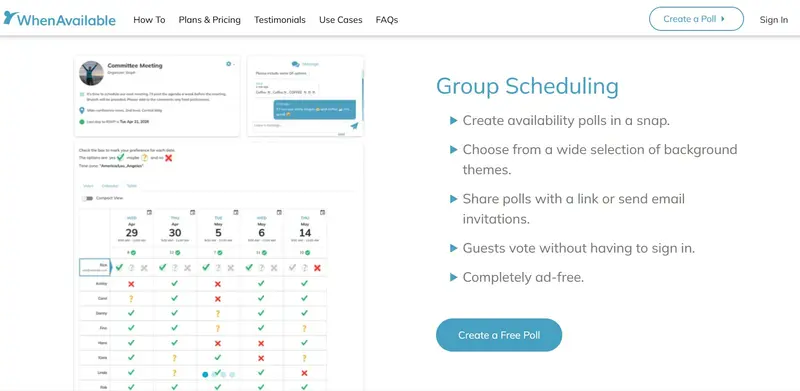
Image via WhenAvailable
WhenAvailable tops the list of WhenIsGood alternatives because it’s built for frictionless scheduling. This scheduling tool helps small business owners, ecommerce shops, and even families quickly organize group meetings.
WhenIsGood relies on grid-style availability selection. That works, but it can feel dated and cluttered. WhenAvailable offers a smoother group scheduling tool built for modern users.
Instead of endless emails, you create a scheduling poll, share it via link or email, and let participants mark their availability. The best part? Guests don’t even need accounts.
What’s more, WhenAvailable provides an ad-free experience that keeps everyone focused. It syncs with Google Calendar and other apps, preventing double-booking. This makes it one of the most dependable WhenIsGood alternatives available.
Key Features:
- Calendar integration for automatic syncing
- Shareable scheduling links for quick invites
- Visual availability grid showing overlap clearly
- Export poll results as CSV or XLSX files for record-keeping
- Privacy controls for invite-only and anonymous voting
- Mobile-friendly design for scheduling on the go
- Automatic time zone detection
Pros:
- Simple setup with no learning curve
- Unlimited free polls for up to 20 guests each
- No accounts, apps, or login needed for guests
- Clean layout with minimal confusion
Cons:
- Google Calendar sync requires a paid plan upgrade
- No built-in video conferencing integration
Pricing:
- Basic: Free
- OneTime: $10/poll
- Premium: $38/year
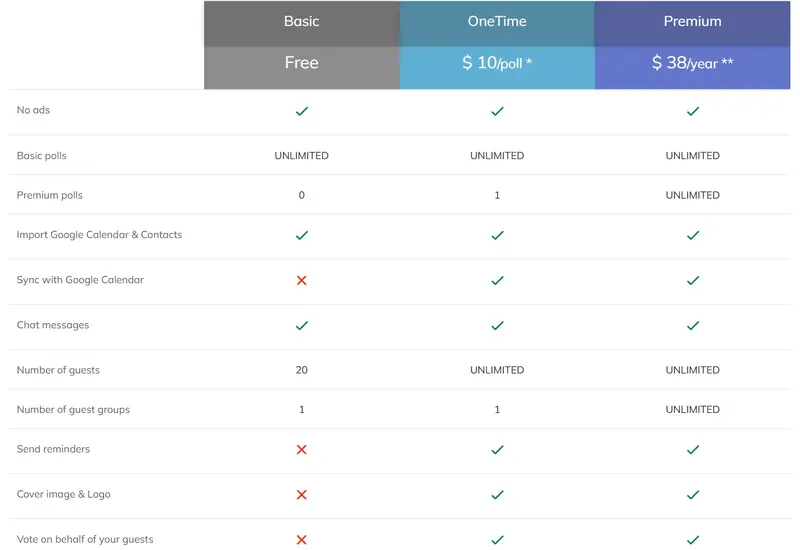
Image via WhenAvailable
Tool Level: Beginner
Usability: Extremely easy to use, even for first-time organizers
Pro Tip: Save your recurring group members as guest groups to speed up poll creation. Premium members can create unlimited groups for book clubs, sports teams, or regular meetings.
2. Reclaim.ai
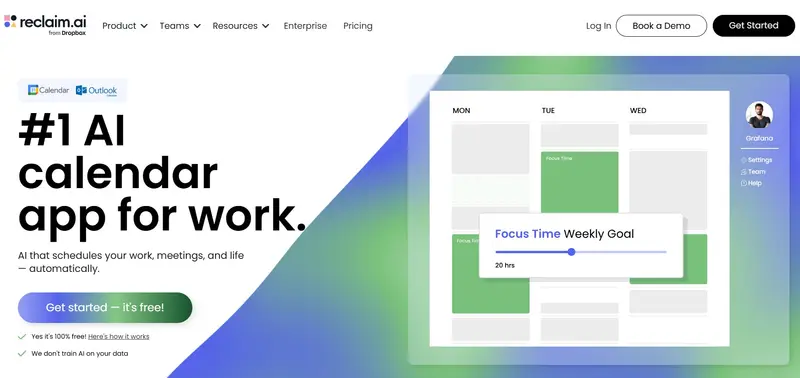
Image via Reclaim.ai
Reclaim.ai stands out among WhenIsGood alternatives with its AI-powered approach to finding meeting times.
Instead of manual grid selection, it offers smart scheduling links that automatically surface your availability. The tool analyzes your calendar priorities and shows booking slots you’d accept.
For team scheduling, Team Links find overlapping availability across multiple calendars instantly. This makes planning a book club meeting or coordinating board meetings simple.
The AI considers what matters most and protects that time. When someone books through your link, lower-priority items automatically reschedule.
Beyond group meeting coordination, Reclaim.ai handles individual calendar management with automatic time blocking for focus work and personal routines.
Key Features:
- Smart meeting time suggestions based on live calendar data
- Round Robin links distribute meeting bookings evenly across your team
- Automatic buffer time adds breathing room between back-to-back meetings
- Custom routines for habits like planning, workouts, or admin work
- Smart task scheduling that adapts to changing priorities
- Automatic focus time blocking to reduce distractions
- Conflict detection and automatic rescheduling
Pros:
- Automates scheduling with minimal effort
- Protects focus time and prevents overload
- Strong task and habit management features
- Integrates seamlessly with Google Calendar and Outlook
Cons:
- Steeper learning curve compared to simple polling tools
- New users often struggle to let go of manual control
Pricing:
- Lite: Free
- Starter: $12/month per seat
- Business: $18/month per seat
- Enterprise: $22/month per set (billed annually)
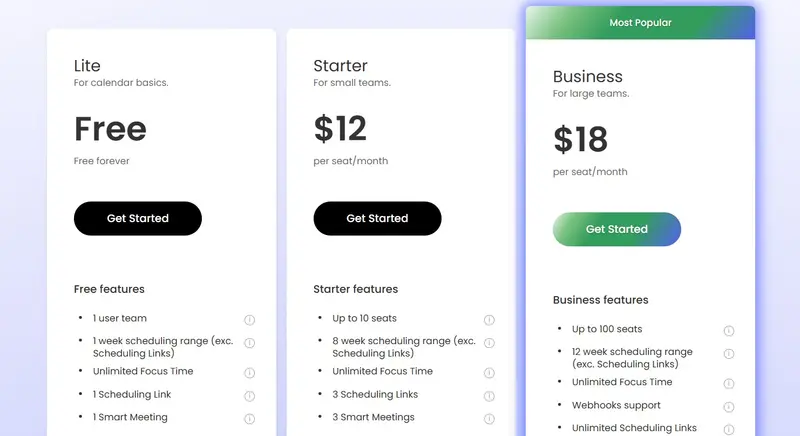
Image via Reclaim.ai
Tool Level: Intermediate
Usability: Requires initial setup to establish priorities and scheduling preferences, but intuitive once running
Pro Tip: Enable Smart Meetings for recurring events. Reclaim will automatically adjust them if calendar conflicts appear.
3. Calday
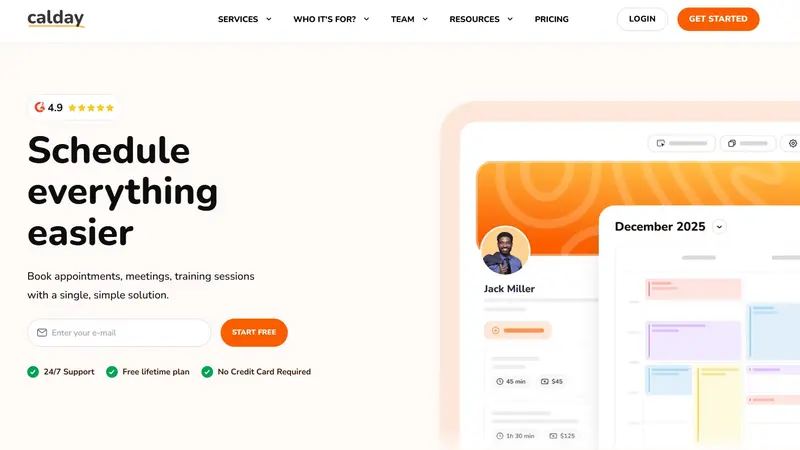
Image via Calday
Calday makes scheduling straightforward with its personal booking page approach. As one of the more accessible WhenIsGood alternatives, it lets clients book directly without back-and-forth emails.
You create customizable booking pages for different appointment types. Then, you share the link and invite people to select the available time slots. The system checks your calendar in real time and prevents double-booking.
Your availability updates in real-time across Google Calendar, Outlook, and Apple Calendar. Calday also automatically handles time zone conversions and sends confirmation emails.
Among modern WhenIsGood alternatives, Calday feels more structured. It’s built for confirmed appointments rather than open-ended voting.
Key Features:
- Automatic time zone detection for global guests
- Built-in calendar view centralizes all appointments
- Customizable booking pages with your logo and branding
- Multi-calendar syncing with Google Calendar, Outlook, and iCloud
- Automated email reminders for reducing no-shows
- Custom booking rules for buffer times and limits
- Integrated video conferencing (Google Meet)
Pros:
- Clean interface clients understand immediately
- Unlimited appointments and clients even on free plan
- 50% discount for non-profits and educational institutions
- Mobile app available for iOS and Android
Cons:
- Free plan restricts you to one service type
- Less flexible for open voting-style scheduling polls
Pricing:
- Free
- Premium: $12/month
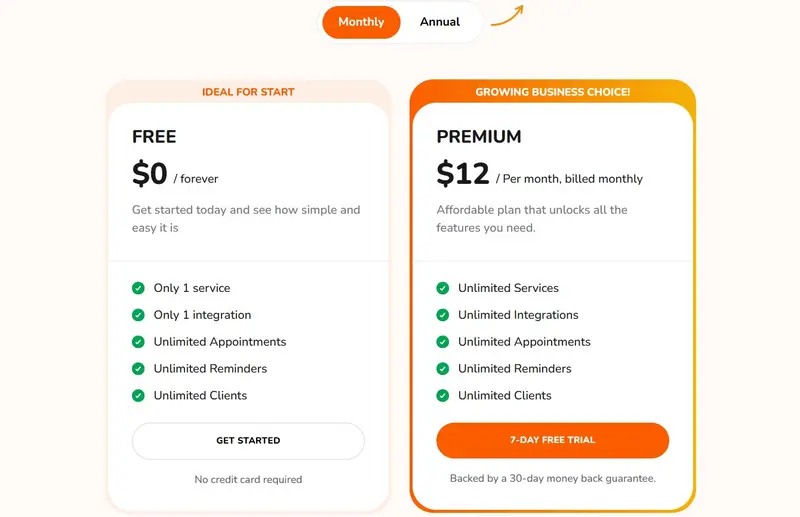
Image via Calday
Tool Level: Beginner
Usability: Clean interface with minimal learning curve
Pro Tip: Use Calday’s buffer settings to protect your time between meetings. It helps you avoid back-to-back fatigue and last-minute delays.
Also Read:
4. SavvyCal
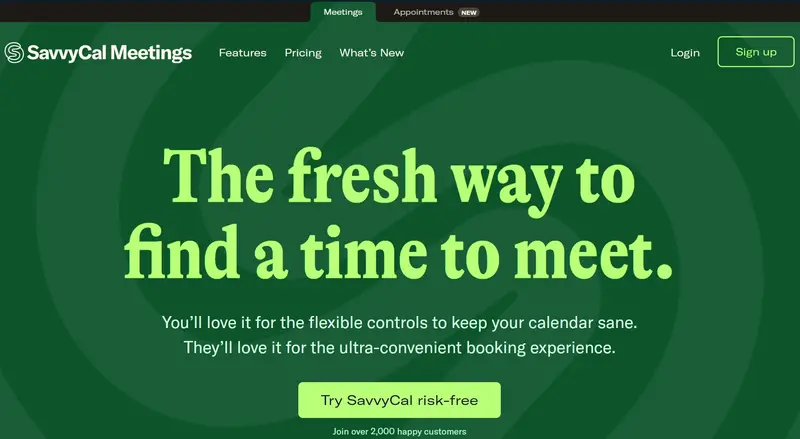
Image via SavvyCal
SavvyCal is one of the most polished WhenIsGood alternatives for people wanting a smoother way to find a meeting time. It lets guests overlay their calendars on yours, removing guesswork and speeding up scheduling.
The platform also excels at meeting polls for group scheduling. You propose multiple times and participants vote on what works best.
Unlike WhenIsGood’s basic grid interface, SavvyCal presents a gorgeous week view that feels intuitive. Small business owners love the ranked availability feature that lets you suggest preferred meeting times while staying flexible.
The tool seamlessly handles team scheduling through collective, round-robin, and group modes.
Key Features:
- Calendar overlay so guests can compare availability instantly
- Meeting polls for group scheduling with voting on proposed times
- Round-robin routing fairly distributes new meetings across your team
- Ranked availability for optimal booking times while maintaining flexibility
- Multi-duration links allow guests to choose between different meeting lengths
- Frequency limits cap meetings per day, week, or month automatically
- Time blocking protects focus time from meeting overload
Pros:
- Beautiful week view interface feels familiar and intuitive
- Time zone selector makes it easy for guests to manually switch time zones
- Extensive integrations with Google Calendar, Outlook, Zoom, and Stripe
Cons:
- Can feel feature-heavy for simple needs
- No mobile app
Pricing:
- Use meeting polls for free
- Basic: $12/month per user
- Premium: $20/month per user
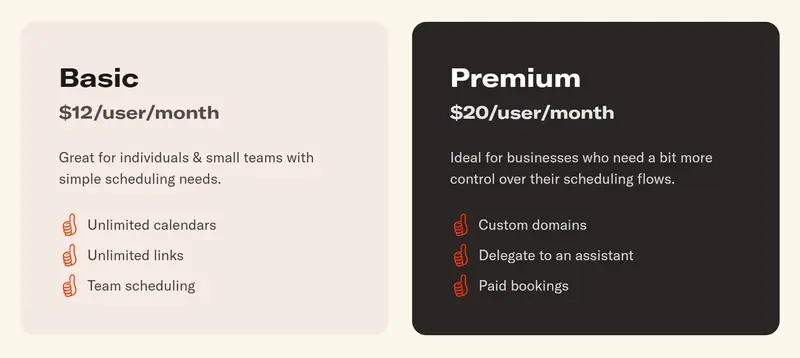
Image via SavvyCal
Tool Level: Intermediate
Usability: Polished, easy-to-navigate interface
Pro Tip: Enable ranked availability on your scheduling links to gently guide people toward “preferred” meeting times.
5. Calendly
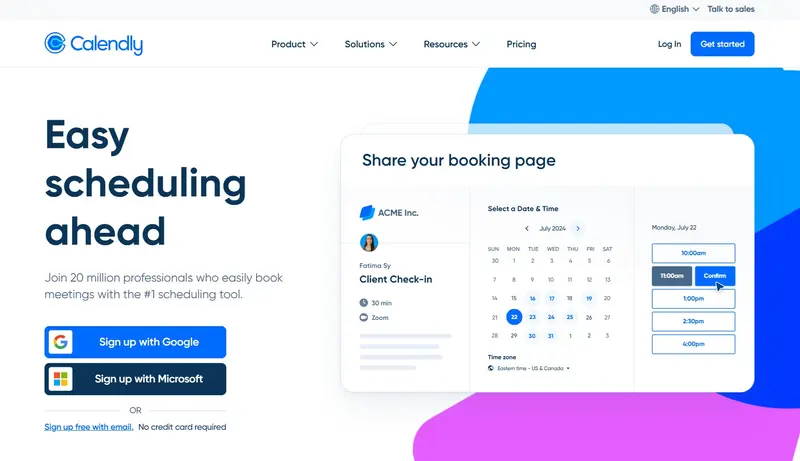
Image via Calendly
Calendly ranks among the most recognized WhenIsGood alternatives in the scheduling space. This scheduling app streamlines finding meeting times with customizable booking links.
Instead of grid-based polling, Calendly lets people see your real-time availability and instantly book slots. The platform also supports group scheduling, round‑robin events, and shared availability.
Meeting polls for group scheduling are included when you need participant input. You propose times and participants vote on preferences.
One of Calendly’s advantages is its integration with virtually every calendar and video conferencing tool available. Its automated reminders also dramatically reduce no-shows.
Key Features:
- Buffer time prevents back-to-back meeting burnout
- Multiple event types for different meeting durations and formats
- Automatic time zone detection to eliminate scheduling confusion
- Routing forms for pre-screening and directing guests with a few questions
- AI Assistant and Notetaker for automatic meeting summaries and action items
- Payment processor integration with Stripe and PayPal
- Automated email and SMS reminders
Pros:
- Great for one‑on‑one and group scheduling
- Extensive automation saves hours on scheduling tasks
- Automatic calendar syncing prevents double-booking
Cons:
- Free plan limited to one event type
- Branding customization requires paid plans
Pricing:
- Free
- Standard: $12/month per seat
- Teams: $20/month per seat
- Enterprise: Starts at $15k/year
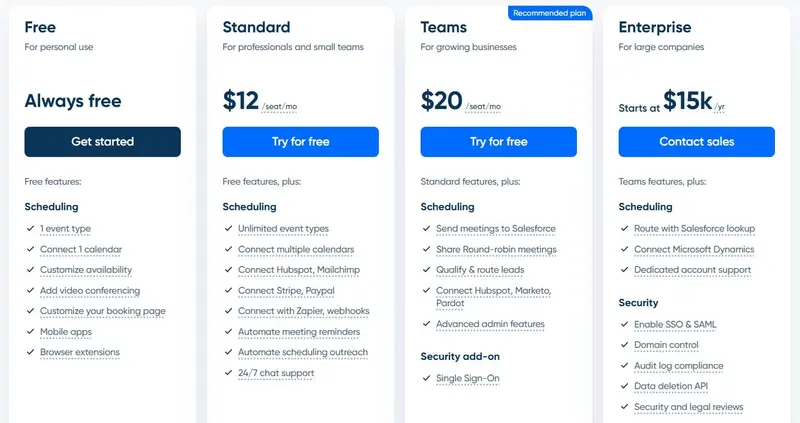
Image via Calendly
Tool Level: Beginner/Intermediate
Usability: Easy to set up and use, even if it’s your first scheduler
Pro Tip: Use the browser extensions to insert available time slots directly into your emails. Recipients click their preferred time and Calendly handles the rest, no separate booking page required.
Also Read:
6. YouCanBookMe

Image via YouCanBookMe
YouCanBookMe is another reliable option among WhenIsGood alternatives, especially if you’re interested in powerful customization.
This scheduling tool excels at creating beautifully branded booking pages that reflect your business identity. It’s effortless to find meeting times with meeting polls built into every plan. You propose multiple time slots and participants vote on what works.
Unlike WhenIsGood’s basic polling, YouCanBookMe automatically sends calendar invites once the group decides. The platform also handles payment collection through Stripe integration.
YouCanBookMe automates confirmations, reminders, and follow-ups via both email and SMS.
Key Features:
- Personalized domains, subdomains, and booking page links
- Customizable booking pages with logos, colors, and backgrounds
- Round Robin distribution and pooled availability for combined team schedule
- Meeting requests allow appointment review and approval before confirmation
- Multiple appointment types with different durations, locations, and pricing
- Advanced availability rules like buffer times and minimum notice periods
- Built-in analytics for tracking popular booking links and trends
Pros:
- Superior multi-language support (40+)
- Integrates with thousands of tools via Zapier
- Meeting Polls feature available even on free plan
Cons:
- No native mobile app
- Free plan restricts you to one linked calendar
Pricing:
- Free
- Individual: $7.20/month
- Professional: $10.40/month
- Team: $14.40/month per member
- Enterprise: Custom pricing
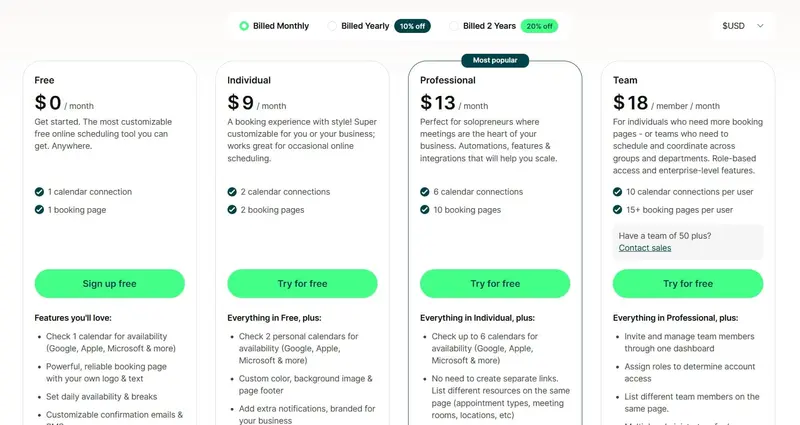
Image via YouCanBookMe
Tool Level: Intermediate
Usability: Quick setup with excellent customization depth for branded booking experiences
Pro Tip: Use the customizable notification feature to send SMS reminders to participants before meetings.
7. Cal.com
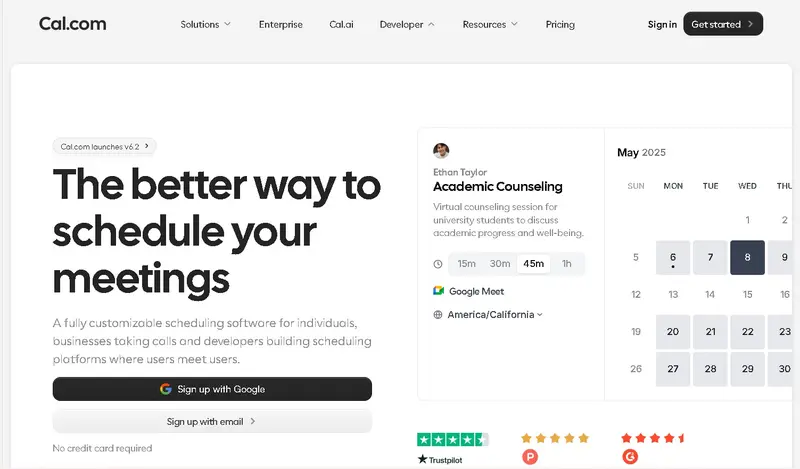
Image via Cal.com
Cal.com is a flexible meeting scheduling platform for individuals, growing businesses, and developers. It is one of the free WhenIsGood alternatives that lets you book meetings without back-and-forth emails.
The platform allows you to define your working hours, add breaks between meetings, and limit how many calls you accept each day.
Similar to most WhenIsGood alternatives, Cal.com allows different meeting types with support for 65+ languages. You also decide whether meetings happen through video, phone, or other tools you connect.
For professionals who charge for their time, the built-in payment option is a great benefit. Clients can pay while booking, which simplifies your workflow.
Key Features:
- Real-time calendar synchronization with automatic conflict detection
- Advanced availability management with customizable working hours
- Adjustable buffer times between scheduled appointments
- Daily, weekly, or monthly booking limit controls
- Customizable and branded booking page links
- Built-in payment collection during appointment booking
- Automated email and SMS notification workflows
Pros:
- Strong customization options for different use cases
- Free plan available for individual users
- Supports payments directly within the booking flow
Cons:
- Some powerful features are only available on paid plans
- Interface can feel feature-heavy
Pricing:
- Individuals: Free
- Teams: $16/month/user
- Organizations: $37/month/user
- Enterprise: Custom pricing
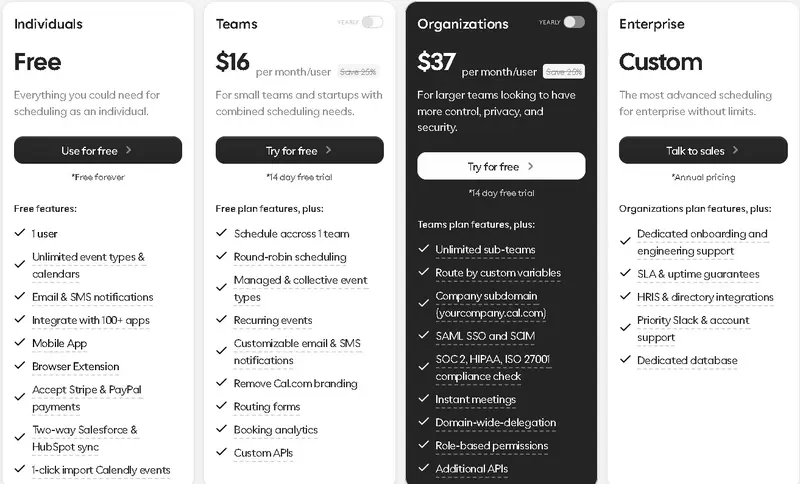
Image via Cal.com
Tool Level: Beginner/Intermediate
Usability: Easy to set up for basic scheduling, with more advanced options available for deeper customization.
Pro Tip: Use the automated reminder feature to send SMS and email notifications before meetings to reduce no-shows.
Also Read:
8. Rallly.co
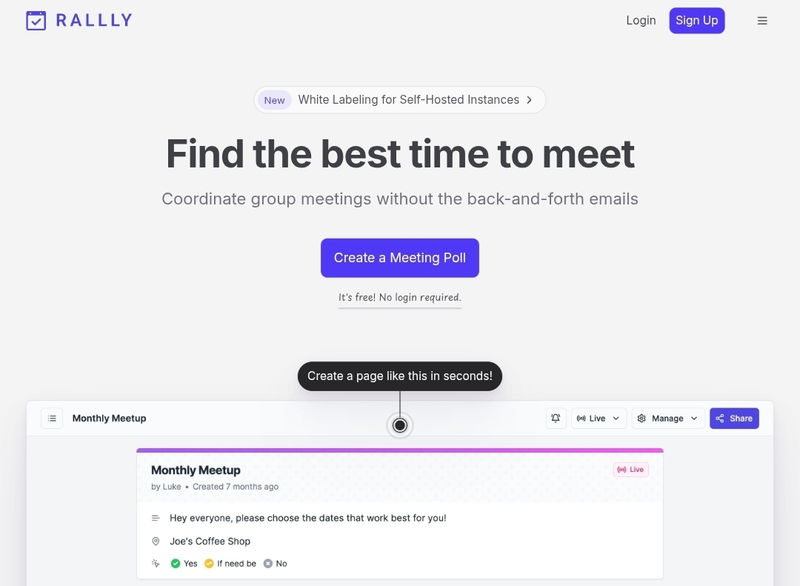
Image via Rallly.co
Rallly.co is one of the beginner-friendly WhenIsGood alternatives that helps groups agree on the best meeting time. You can create a poll and let participants vote on the dates and times that work for them. The results are displayed in one clear view, which makes it easy to choose the most suitable option.
One of Rallly’s helpful features is automatic time zone detection. When participants join from different locations, the platform adjusts the time options to match their local time zone.
This is useful for remote teams and international collaborations. If needed, you can disable this feature so everyone sees the same fixed time.
For advanced users, Rallly also offers white labeling options for self-hosted instances. While individuals can use the free hosted version, businesses with technical teams can explore deeper customization.
Key Features:
- Quick poll creation with customizable event titles and descriptions
- Month and week calendar views for flexible date selection
- Automatic time zone conversion for international participants
- Instant shareable invite links for group participation
- Clean and easy-to-read availability voting table
- Multi-language support for global accessibility
- White labeling options for self-hosted deployments
Pros:
- Free to use for core scheduling features
- No mandatory sign-up process
- Simple and modern user interface
Cons:
- Limited advanced automation features
- No built-in reminder system compared to advanced WhenIsGood alternatives
Pricing:
- Hobby: Free forever
- Pro: $7/month
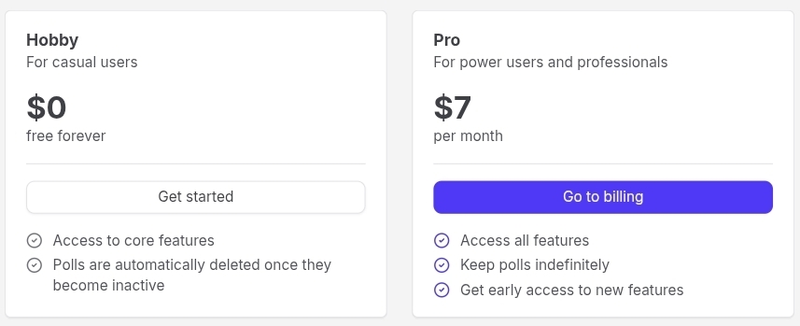
Image via Rallly.co
Tool Level: Beginner
Usability: Very easy to use without account signup required
Pro Tip: Enable automatic time zone conversion when scheduling international meetings to prevent confusion.
9. LettuceMeet
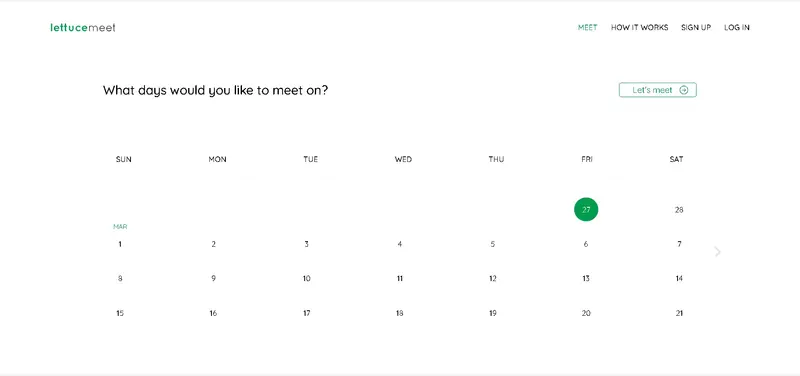
Image via Lettucemeet.com
LettuceMeet is a simple online tool that helps groups find a meeting time that works for everyone. Instead of sending multiple planning messages, you create a meeting page and share a link with your group. Everyone marks when they are free, and the tool shows the best overlap.
One of the biggest advantages of LettuceMeet is that it does not require an account to start scheduling. You can create and manage a meeting directly from the website. This makes it one of the easiest WhenIsGood alternatives for users who want something lightweight.
The platform also allows users to connect their Google Calendar. When connected, you can see your existing events while selecting availability. Teams searching for simple WhenIsGood alternatives for casual meetings and small collaborative tasks would find LettuceMeet useful.
Key Features:
- Simple date range and single-day meeting selection interface
- Visual time-slot selection grid for marking availability
- Shared meeting link for easy group participation
- Automatic overlay of all participant availabilities
- Free-to-use web-based scheduling platform
- Google Calendar integration for viewing existing events
Pros:
- No account required to create or manage meetings
- Completely free to use
- Very simple and beginner-friendly interface
Cons:
- Limited advanced features for businesses
- Fewer integrations compared to WhenIsGood alternatives with advanced scheduling tools
Pricing: LettuceMeet is free to use.
Tool Level: Beginner
Usability: Very easy to use, with a straightforward interface
Pro Tip: Connect your Google Calendar before selecting your availability so you can clearly see existing events and avoid accidental conflicts.
Also Read:
10. Doodle

Image via Doodle
Doodle is one of WhenIsGood alternatives that works for teams of any size. You can create group polls where participants vote on available time slots. Also, you can set up a personalized booking page for one-on-one meetings.
This flexibility makes Doodle useful for meetings like book clubs, client consultations, board meetings, and recurring team meetings.
Many businesses consider Doodle as one of the reliable WhenIsGood alternatives for managing invitations and reminders. Once a meeting is confirmed, participants receive notifications automatically.
Compared to some Doodle alternatives, the platform supports secure payment collection during booking. This means clients can pay when they schedule an appointment. It removes the need to send invoices later and creates a smoother experience.
Key Features:
- Automatic calendar synchronization with real-time availability updates
- Secure online payment collection during appointment booking
- Customizable and branded scheduling pages
- Automated email invitations and meeting reminders
- Integration with major video conferencing platforms
- Compatibility with popular calendar providers and productivity tools
- Group polling system for collective time selection
Pros:
- Supports payment collection at booking
- Strong integrations with popular business tools
- Reliable security and compliance framework
Cons:
- Free plan has limited customization options
- Payment processing depends on third-party integration
Pricing:
- Free Plan
- Pro: $14.95/user/month
- Team: $19.95/user/month
- Enterprise: Custom pricing
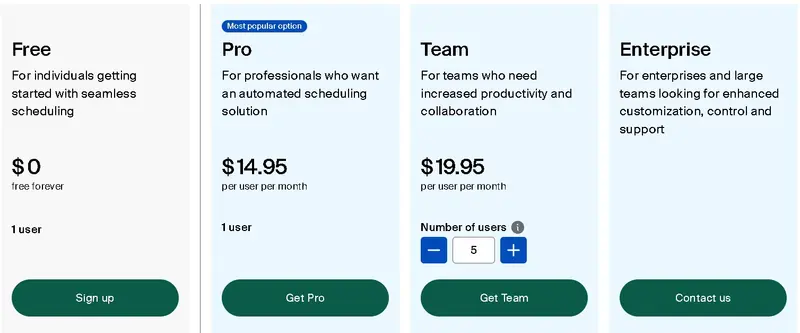
Image via Doodle
Tool Level: Intermediate
Usability: Moderately easy to use for creating quick polls
Pro Tip: Use the group poll feature when scheduling large meetings so participants can vote on time slots.
11. When2meet
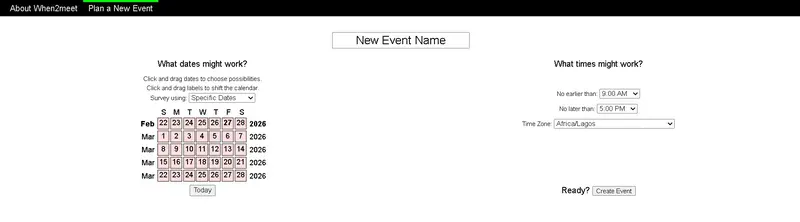
Image via When2meet.com
When2meet is a free online tool that helps with event scheduling. It focuses on collecting availability from multiple people and showing where schedules overlap.
Participants mark the times they are available by highlighting blocks on a grid. As more people respond, the chart updates to show overlapping availability in one shared view. This visual system makes it simple to spot the best meeting time without complex calculations.
Unlike some When2meet alternatives that require setting up an account before use, the tool doesn’t require users to sign up or log in.
The platform does not ask for billing or contact details, and it is free to use. Because of this ease of use, it is considered one of the most straightforward WhenIsGood alternatives for students, clubs, and informal groups.
Key Features:
- Free online availability survey creation
- Click-and-drag calendar date selection interface
- Customizable daily time range settings
- Visual grid-based availability marking system
- Real-time overlap display for group responses
- Adjustable time zone selection during event setup
- Shareable event link for easy participant access
Pros:
- Completely free to use
- No sign-up required
- Very simple and lightweight interface
Cons:
- No built-in reminders or notifications
- Basic design and minimal customization options
Pricing: The tool is completely free to use.
Tool Level: Beginner-friendly tool for group meeting planning
Usability: Very easy to use with a straightforward grid system
Pro Tip: Set the correct time zone before sharing your event link to prevent confusion when participants are joining from different locations.
Also Read:
FAQ
1. What is WhenIsGood?
WhenIsGood is a simple tool to check availability for a meeting. Organizers create a time grid, and respondents click on the slots that work. There’s minimal setup, limited data collection, and a basic iCal export. It gets the job done fast, especially when you don’t want to force people to create accounts.
2. Why do people look for WhenIsGood alternatives?
People hunt for WhenIsGood alternatives because modern scheduling usually needs more than a grid. Folks want time-zone handling, video links, buffer times, and payment or signup options for client bookings. WhenIsGood is simple, but it lacks the workflow features that save organizers time.
3. What is the best free scheduling software?
WhenAvailable is a top pick if you want fast, private polls without the fuss. It offers unlimited free polls (up to a guest limit per poll) and a clean flow for one-off meetings. It’s ideal when you need something simple and reliable.
4. What features should I look for in WhenIsGood alternatives?
Prioritize clear time-zone handling and a neat mobile flow. Make sure it integrates with your calendar and other apps. Look for simple booking links, calendar blocking, and easy rescheduling. Also, consider your budget and needs.
5. What makes WhenAvailable stand out among WhenIsGood alternatives?
It blends poll simplicity with cleaner UX and useful extras. The interface is modern, polls are private by default, and organizers can export results or add chosen slots to a calendar quickly. For groups that want fast polls without losing basic integrations, it hits a nice middle ground.
Conclusion
Finding the right scheduling tool to plan a team meeting can save you hours of back-and-forth messages. While WhenIsGood works for basic availability sharing, many modern teams now need more flexibility, automation, and integrations.
The WhenIsGood alternatives on this list offer different features, from group polls to branded booking pages, payment collection, calendar syncing, and developer APIs.
The best choice depends on how complex your scheduling needs are, how large your team is, and whether you need advanced features.
If you want a modern scheduling platform that combines smart calendar syncing and powerful team features, then WhenAvailable is worth exploring.