OCTOBER 29 2026 - 15 MIN READ
Best DnD Scheduler: 3 Tools for Weekly Campaigns
Table of Contents
- Quick Summary: The Best D&D Scheduler by Job
- How We Compared the Best DnD Scheduler and Why
- D&D Scheduling Tools Compared at a Glance
- What Are the Common Challenges With Scheduling a Weekly D&D Campaign?
- How Do You Choose a D&D Scheduling Tool?
- Best D&D Scheduling Tools for Group Campaigns
- Which D&D Scheduling Tool Should You Choose?
- FAQ
- Final Thoughts on D&D Scheduling Tools
Finding a time that suits every player can delay a Dungeons & Dragons (D&D) session for weeks. DnD scheduling tools help groups agree on session dates without back-and-forth messages. The right tool can make planning regular meetings much easier.
Based on Groupfinder's 2026 State of Tabletop report, 63% of groups meet every week and just 2% monthly. Also, 85% run campaigns compared to 14% one-shots. These data show why reliable scheduling is important for regular gaming groups.
This guide compares three best DnD scheduling tools for weekly campaigns. We examine free-plan limits, player access, and recurring scheduling options.
|
Quick Summary Choose the best DnD scheduler based on player access, table attendance policies, and how your table plans game nights.
|
Quick Summary: The Best D&D Scheduler by Job
The best D&D scheduler depends on how your group plans game nights. Some tools focus on quick availability polls, while others support flexible attendance or automated Discord reminders.
Here is what each tool is good for:
- WhenAvailable: Best DnD scheduler for quick polls without requiring players to create accounts.
- Tabletop Time: Best tool for groups that can play even when some players cannot attend.
- Apollo: Best for groups that use Discord to organize games and send reminders.
Your choice depends on your group's needs and how players prefer to respond. A good D&D group scheduling tool should make it easy to find a meeting time, while reducing the administrative strain on the organizer.
Also Read:
How We Compared the Best DnD Scheduler and Why
The best D&D scheduling tools should make it easy to plan sessions and keep a campaign going. We compared three tools using five criteria that affect how well a group can schedule games.
Each figure came from the vendor's own pricing and feature pages, reviewed on October 23, 2026.
Here are the five factors we considered:
- Player Access: Can players vote without creating an account? Every extra step can discourage busy players from responding.
- Free Plan Limits: What does each free plan allow? Check guest limits, available time slots, and other usage caps.
- Recurring Sessions: Can you schedule a repeating game night? Recreating polls for every session adds work and can frustrate players.
- Time Zone Support: Does the tool convert times for players in different time zones? A scheduling mistake can make players miss the entire session.
- Flexible Attendance (Party Quorum): Does the tool help your table run sessions even if a player bails? Setting a minimum player threshold (quorums) can prevent unnecessary cancellations.
These criteria also apply when you need to schedule meetings with multiple people. However, D&D tables have specific needs, including recurring campaign sessions and flexible attendance. The best D&D scheduling tools should account for these needs without adding extra prep work for the Game Master.
Player access matters because every party member needs an easy way to respond. If signing up creates friction, some players may never submit their availability. Recurring scheduling can save time by reducing the need to create new polls.
|
What Makes the Best DnD Scheduler? The best DnD scheduler offers easy player access, fair free plan limits, and recurring sessions. It should also support different time zones and flexible attendance. |
Also Read:
- WhenAvailable vs Doodle: Which Scheduling Tool Is Right for You?
- Best WhenIsGood Alternatives You Should Try
D&D Scheduling Tools Compared at a Glance
The best D&D scheduling tools differ in price, player access, and recurring session support. Some let players vote without creating accounts, while others work through Discord. Their free plans also vary in how many events or players they support.
The table below compares three tools using their published features and prices.
| Tool | Best For | Free-Plan Limit | Player Sign-Up? | Recurring Sessions? | Time Zones | Starting Price |
|---|---|---|---|---|---|---|
| WhenAvailable | Quick polls with minimal effort | 20 guests, 80 date, time, and question slots, and one guest group | No | No. Duplicate polls on a paid plan | Yes, automatic conversion per guest | Free. OneTime costs $14 per poll. Premium costs $49/year |
| Tabletop Time | Playing without a full table | Unlimited events and players | No | Yes, supports a series of sessions | Yes, per player | Free, with no paid tier |
| Apollo | Groups already using Discord | Five recurring events, two-month history, and one reminder per event | Discord account required | Yes, up to five on the free plan | Not documented | Free. Paid plans cost $8/month |
Also Read:
- Family Reunion Planning Checklist with a Free Printable
- Best Interview Scheduling Tools for Faster Hiring
What Are the Common Challenges With Scheduling a Weekly D&D Campaign?
Scheduling a weekly D&D campaign can be difficult when players have conflicting schedules. Missed replies, last-minute changes, and different time zones can delay sessions.
Game masters must also decide whether to cancel or play without absent players. These problems can make it difficult to keep a campaign running smoothly.
Many groups rely on chat apps and calendars to organize their games. A 2026 Daggerheart community survey found that 55.9% of respondents used group messaging apps for scheduling. Discord Events followed at 22.1%, while Google Calendar accounted for 7.4%.
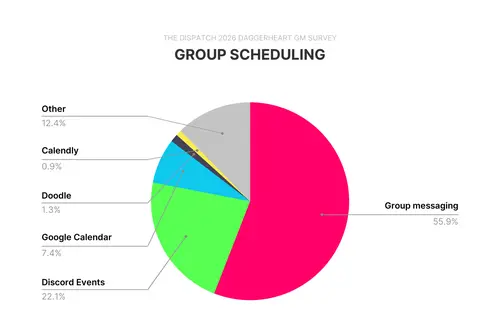
Image by The Dispatch
The best D&D scheduling tools let players suggest additional date and time options when plans change to avoid conflicts.
Here are the primary challenges that can disrupt a weekly D&D campaign.
1. Conflicting Schedules
Players may have work, family duties, and busy lives outside the game room. For online parties playing via Roll20, Foundry, or Discord, players are frequently scattered across multiple time zones. Microsoft's 2025 Work Trend Index found that about one third of meetings cross time zones. This adds another challenge for groups playing online.
2. Players Who Forget to Reply
Some players reply instantly, while others miss messages or forget to vote. Chasing down party members by manually sending reminders puts an unnecessary administrative burden on the Game Master and delays session prep.
3. Repeated Polls
Creating a new poll before every single session gets exhausting. The best D&D scheduling tools reduce this effort with saved guest groups or recurring events.
4. Unclear Attendance Rules
Some groups need every player present, while others can play with fewer people. Without a clear policy established upfront, the game master faces a tough decision every time someone can't make it.
5. Last-Minute Changes
A player may become unavailable after everyone agrees on a date. The group must then choose between postponing the game and playing with fewer people.
|
What Makes Weekly DnD Scheduling Difficult? Conflicting schedules, missed replies, poll fatigue, and sudden drop-outs can disrupt weekly D&D sessions. Scheduling tools with saved groups, reminders, and flexible date options can make planning easier. |
Also Read:
- Family Reunion Ideas to Bring Every Generation Together
- Book Club Discussion Questions (Free Printable)
How Do You Choose a D&D Scheduling Tool?
Choose a D&D scheduling tool based on your group's main scheduling problem. If players forget to reply, look for reminders and simple polls. If players reply but cannot attend together, focus on flexible dates and attendance rules.
Ask these five questions before choosing a tool.
- What Is Your Table Size? Smaller parties can usually manage without needing paid subscriptions tools or complex features.
- Where Does Your Party Chat? If your entire table lives on a dedicated Discord server, a native Discord bot that sends pinged event reminders directly in your text channels keeps everything in one place.
- Is Your Game Night Fixed or Flexible? Fixed nights need reminders, while flexible schedules need polls.
- What Is Your "Party Quorum"? Deciding your minimum threshold determines what features you need.
- Are Players in Different Time Zones? Choose a tool that adjusts times for each player's location.
Your answers can help you narrow down the options:
- Small Group With No Accounts: Choose WhenAvailable for simple scheduling.
- Flexible Attendance: Choose Tabletop Time if you frequently run games with missing players.
- Group Chat or Email: Choose WhenAvailable to collect players' availability.
- Discord Users: Choose Apollo if your party prefers to schedule games in Discord.
- Frequent Schedule Changes: Choose WhenAvailable or Tabletop Time to compare available dates.
- Fixed Weekly Games: Choose Apollo if you mainly need reminders.
If a shared calendar already works, you may not need another tool. You can use the same approach for any recurring gathering, from a book club meeting to a monthly board game night.
Best D&D Scheduling Tools for Group Campaigns
The best DnD scheduler for scheduling campaigns include WhenAvailable, Tabletop Time, and Apollo. Each of them handles different needs, and the right choice depends on how you plan and confirm sessions.
Below is a detailed breakdown of each tool's key features, pros, cons, pricing, and usability.
1. WhenAvailable
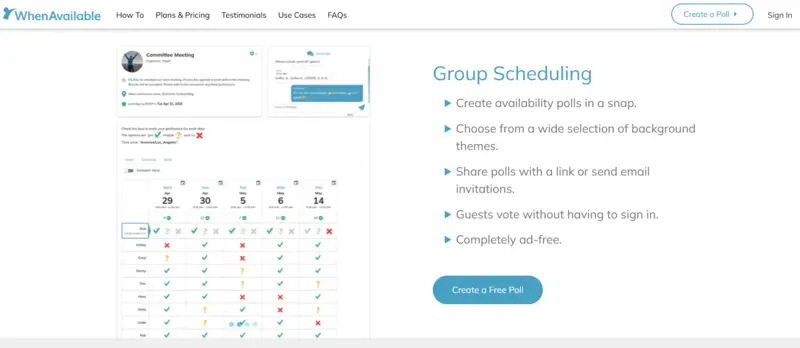
Image via WhenAvailable
WhenAvailable is a free and ad-free DnD scheduler that lets you find a suitable time without chasing players for replies. You create a poll, add possible dates and times, and share one link. Players can vote without creating accounts or installing an app.
Each player can mark an option: Yes, No, or Maybe. The tool also adjusts times for each player's time zone. These features make it a great D&D scheduler for tables with changing availability. Players can respond quickly, even if they rarely use scheduling apps.
Organizers can add custom questions to collect other details about a session. Saved party groups let you reuse the same player list for future polls. However, the free plan does not support recurring polls, so you may need to create new polls manually.
Key Features
- No Guest Sign-Up: Players vote straight from a link, with no account and no app
- Automatic reminders: Organizers can set automatic voting reminders and event reminders once a date has been selected.
- Time Zones: Each player sees the poll in their own device's time zone
- Chat and Custom Poll Questions: Ask players about campaign details or session preferences
- Poll Themes: Choose from available themes for D&D and game nights
Pros
- Ad-free on every tier, including the free plan
- Players do not need accounts or app downloads
- The saved party list feature speeds up repeated group meeting scheduling
Cons
- The free plan does not include recurring polls
- The free tier limits combined date, time, and question slots to 80
- OneTime Premium upgrades only one poll
Pricing
Basic is $0, covering 20 guests, one guest group, and 80 date/time slots. OneTime Premium is $14/poll for one premium poll and unlimited guests. Premium is $49 per year for unlimited premium polls.
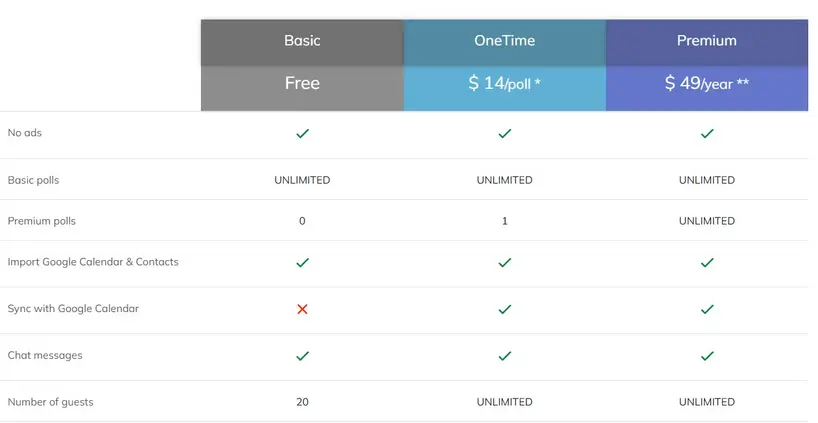
Image via WhenAvailable
Tool Level
Fits individuals and small groups, from a four-player table to a 40-member club.
Usability
Nothing to learn for players. Organizers need an account and an email check, then one screen to create a poll.
Pro Tip: Save your player list as a group before creating your first poll. You can reuse the same group whenever you schedule another session.
Also Read:
2. Tabletop Time
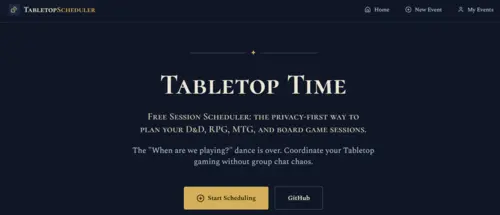
Image via Tabletop Time
Tabletop Time is the best DnD scheduler for groups that want flexible planning. Players mark when they are free, and the tool highlights dates that meet your attendance target. Its free plan includes unlimited sessions and players.
Its main strength is quorum scheduling. You set the minimum number of players needed, and the tool highlights dates that meet that number. If your campaign can run without a full party present, this feature significantly reduces cancellations.
Tabletop Time also offers waitlists, campaign scheduling, and Discord and Telegram bots. However, the service is newer. Groups should test its features before relying on it for a long campaign. Still, this is the best DnD scheduler worth exploring if attendance rules matter to your table.
Key Features
- Quorum Settings: Set the minimum number of players needed for a session
- Availability Polls: Let players mark the dates and times they can attend
- Waitlists: Manage extra players when a table reaches its capacity
- Campaign Mode: Schedule a run of sessions instead of choosing one date
- Discord and Telegram Bots: Vote and get reminders without leaving chat
Pros
- Free, with no upgrade path to manage
- No logins, no apps, and no email address collected
- The tool can propose several sessions in one planning round
Cons
- Recovering access needs a linked Telegram or Discord account
- Players still need to select suitable dates from proposed sessions
- Old events are deleted, and no retention period is documented
Pricing
The Community Edition is $0 forever, with unlimited events and unlimited players. There is no paid tier and no trial clock.
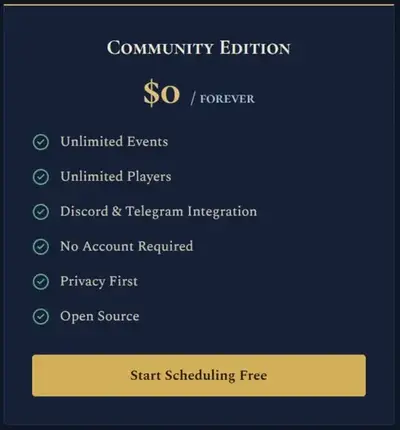
Image via Tabletop Time
Tool Level
Tabletop Time suits hobby groups, regular D&D tables, and small pickup gaming clubs.
Usability
The basic process is simple, but organizers should keep their access details safe.
Pro Tip: Set your quorum one player below your full table size. This gives your party more chances to play without forcing anyone to attend every session.
3. Apollo
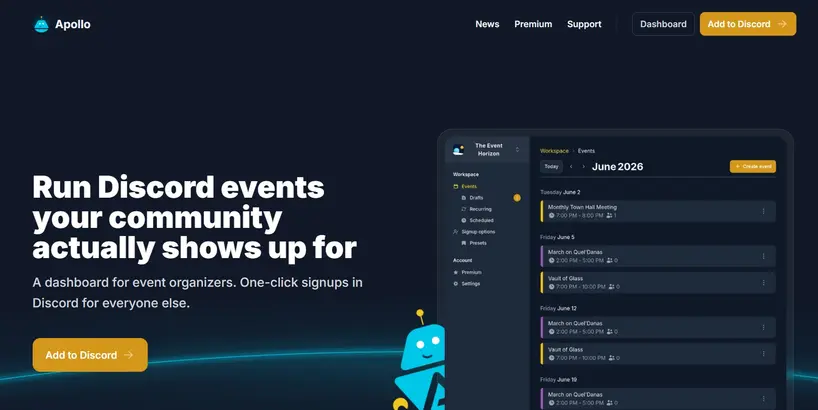
Image via Apollo
Apollo is a Discord event bot and the best DnD scheduler to pick once your game night is fixed. It does not search for a time that suits everyone. Instead, it lets you post a session, collect RSVPs, and remind players to respond. This works well when your table already agrees on a regular game night.
The bot supports recurring events, attendance limits, and reminders. It also lets organizers edit one session without changing the entire campaign series.
If your party needs to compare possible dates first, Apollo is not the best DnD scheduler to consider. A poll-based tool is a better fit.
Key Features
- Recurring Events: Schedule repeated sessions, with five recurring events on the free plan
- Single-Event Edits: Change a session without moving the whole series
- Capacity Limits: Limit attendance based on RSVP order
- Event Reminders: Send one reminder per event on the free plan, and five on Premium
- Discord Integration: Create and manage events where your group already chats
Pros
- Apollo is the best DnD scheduler here that repeats a slot on a free plan
- It works inside Discord, where many groups already communicate
- DMs can edit one session without changing future events
Cons
- Every player needs a Discord account and server membership
- It can't find a time for meeting, only confirm a night you've chosen
- Free plans keep only two months of event history
Pricing
Free covers unlimited events and up to 5 recurring events. Premium is $8 per month, while Premium Pro runs $25 monthly.
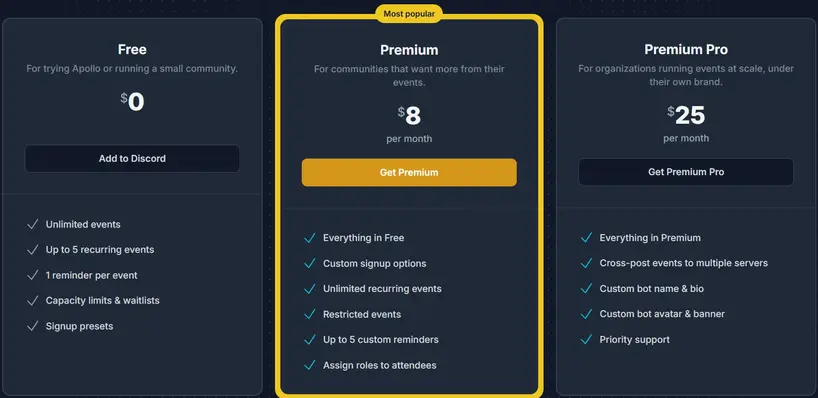
Image via Apollo
Tool Level
Apollo suits established groups with a settled weekly game night.
Usability
Setup involves a few Discord commands, and players need no training at all. It can't limit votes per slot the way a poll tool does.
Pro Tip: Edit a single event when one session needs to move. Don't edit the entire series unless you want to change every future session.
|
Which D&D Scheduling Tool Should You Choose?
|
Also Read:
FAQ
1. What is the best app to schedule D&D sessions?
WhenAvailable is the best DnD scheduler for most tables. Players vote from a link even without an account at all. Tabletop Time is the better pick if you want a quorum rule and a run of sessions. Apollo wins once your night is fixed, and you only need reminders.
2. What's the fastest way to get a D&D session on the calendar?
One poll and one saved party list. That is how to set up scheduling for D&D, start to finish. Create a poll with four or five evening options. Share the link in your group chat, and give your table 48 hours to respond. Save your players as a guest group while you're there.
3. Is there a free D&D scheduling website?
Yes, all three DnD scheduling tools have one, and Tabletop Time is free with no paid tier at all. WhenAvailable's Basic plan covers 20 guests and 80 slots. Apollo's free plan includes five recurring events. Any of the three best DnD scheduler tools handles a home table comfortably.
4. What's a realistic cadence for a D&D group?
Weekly sessions are great if everyone agrees on the same time. The best DnD scheduler can help parties find dates that suit most players. If players struggle to attend every week, switching to biweekly sessions may work better.
5. What should you do about a player who keeps canceling?
Establish a party quorum (a minimum player count) so game night proceeds even if one person bails. The best DnD scheduler can help you find dates when enough players are available. This keeps one player's absence from disrupting the whole campaign.
6. What is a “quorum rule” in D&D scheduling?
A quorum is the minimum number of players needed to run a main campaign session. For a five-player group, you might set the quorum at four. With Tabletop Time, you see dates that meet your chosen number. It is the best DnD scheduler for groups that often struggle with attendance.
7. What's a typical D&D session length?
Most D&D sessions last two to four hours. Choose a session length before setting the date and time. The best DnD scheduler can help you find a suitable slot for everyone.
8. Can a D&D scheduler handle different time zones?
Yes, some tools can automatically adjust session times for each player's time zone. WhenAvailable and Tabletop Time support this feature, while Apollo's documentation does not confirm it. The best DnD scheduler for international groups should show each player the correct local time.
Also Read:
Final Thoughts on D&D Scheduling Tools
The best DnD scheduler depends on what makes planning difficult for your group. WhenAvailable makes it easy for players to vote without signing up. Tabletop Time helps you plan around a minimum player count. Apollo manages recurring sessions and reminders through Discord.
Before making a choice, identify your biggest event scheduling problem. Do players forget to vote, or only a few players show up? The best DnD scheduler should solve that problem without adding extra work.
Ready to get your table booked? Compare the plans on WhenAvailable and pick the one that fits your table best.