
OCTOBER 19 2026 - 15 MIN READ
Listen to this blog post as an AI podcast
7 Best Group Planning Apps for Trips and Getaways in 2027
Table of Contents
- What Are the Best Group Planning Apps at a Glance?
- How Did We Pick the Best Group Planning Apps?
- How Do the Best Group Scheduling Apps Compare At a Glance?
- What Are the 7 Best Group Planning Apps to Use in 2027?
- How Do You Get Your Group to Agree on a Day & Time?
- FAQ
- Best Group Planning Apps: What Are the Key Takeaways?
The best group planning apps depend on what you need to manage. For example, WhenAvailable helps find a time that suits everyone. Wanderlog builds shared itineraries, Splitwise tracks shared expenses, and Roadtrippers plans road trips with multiple stops.
If someone pitches a trip idea, your group chat can fill with options for activities, budgets, meals, and availability. In 2026, 84% of travelers had a group trip plan stuck in a chat. KAYAK found that trip planning took one to three months on average.
Group planning apps help collect everyone’s availability and run polls to agree on destinations or activities. They also help split expenses, create itineraries, and manage packing. Choosing the right app can keep your trip organized.
In this guide, you’ll learn how we picked the best group planning apps, what each one is best for, and what it costs. You’ll also see how each app can help your group agree on plans and organize the trip.
|
Quick Summary The best group planning apps can help you collect availability and coordinate plans. They also help split expenses and manage packing. Choose an app based on the tasks you need to manage, group size, and planning style. The right app can cut down on back-and-forth messages in group chats and make planning easier. |
What Are the Best Group Planning Apps By Use Case?
The best group planning apps support different tasks when organizing a trip. WhenAvailable and Google Travel, and AI Mode can help with availability and choosing destinations. Wanderlog, TripIt, Splitwise, Roadtrippers, and PackPoint can help create itineraries and manage bookings, expenses, routes, and packing.
You can combine these planning apps when organizing a family reunion trip or a friends’ weekend away. Here’s a breakdown of the apps and what they are best for:
- Best for Coordinating Schedules: WhenAvailable, Google Travel and AI Mode
- Best for Organizing Booking Confirmations: TripIt, Wanderlog
- Best for Shortlisting Destinations: WhenAvailable, Google Travel and AI Mode
- Best for Managing Trip Costs: Splitwise
- Best for Planning Road Trips: Roadtrippers, Wanderlog
- Best for Creating Packing Lists: PackPoint, Wanderlog
How Did We Pick the Best Group Planning Apps?
We chose the best group planning apps based on how easily guests can join an availability poll and how intuitive each tool is. We also considered real-time collaboration, availability and scheduling capabilities, expense tracking, and pricing:
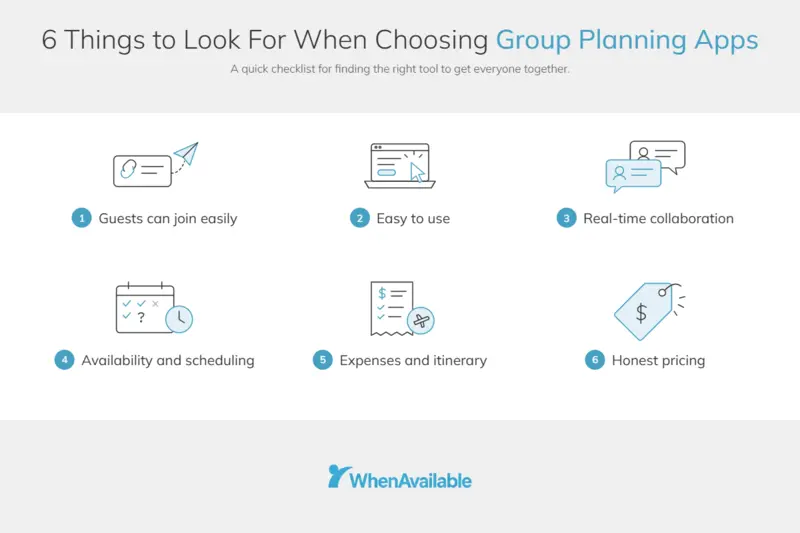
Image via WhenAvailable
- Guests Can Join Easily: Guests should be able to take part in polls without an account or an app download. Good tools let you share a link so guests can join the poll directly.
- Ease of Use: The app should be intuitive for non-technical users to navigate easily. This matters because high-friction onboarding can reduce response rates.
- Real-Time Collaboration: The best group trip-planning tools allow multiple members to contribute at the same time. One person can add locations while another can update schedules simultaneously.
- Availability and Scheduling Capabilities: Guests should vote on time and day options through one link. The organizer can compare those responses and find a time that works for the group.
- Expenses and Itinerary: You need a group trip planning app that tracks who paid what. It should also automatically calculate balances.
- Honest Pricing: The pricing for the best group planning apps comes from each vendor's site. If a vendor doesn't publish a price, we mention it in the guide.
|
How Were the Best Group Planning Apps Chosen? We chose the group planning apps based on how easily guests and organizers can use them. We also considered real-time collaboration, availability, and scheduling capability. Being able to track expenses and itineraries in one place is also a plus. Pricing was verified from the vendors’ official sites. |
How Do the Best Group Scheduling Apps Compare At a Glance?
The best group planning apps vary by use case, free-plan limits, pricing, and guest access. This table compares the main features, account requirements, and costs:
| App | Best for | Free plan? | Free-plan limit | Starting price | Account required? |
|---|---|---|---|---|---|
| WhenAvailable | Coordinating schedules | Yes | 20 guests per poll | $14 for one poll (one-time). $49/year for Premium. | No, trip mates can vote without an account. You simply share a link. |
| Google Travel and AI Mode | AI itinerary drafts and destination ideas | No price listed | Not stated | No paid tier listed | Not stated |
| Wanderlog | Collaborative map-based itinerary building | Yes | Features such as offline access, route optimization, and Gmail scanning are only available on Pro Annual | $39.99/year | No. Trip mates can view and edit itineraries. |
| TripIt | Consolidating itineraries from forwarded emails | Yes | Uploads are limited to 3 documents per trip | $49/year | You need an account to create and manage trips. You can then share your plan with family or friends. |
| Splitwise | Tracking shared expenses | Yes | Four expenses a day | Not published on its site | Sign up through the sign-up page or mobile app. A friend can also send you a link to share expenses. |
| Roadtrippers | Mapping road-trip routes | Yes | One saved trip and three stops. No custom map styles in the Free tier | $11.99/month | Yes, both organizers and collaborators need an account for group planning. Collaborators can use a Free account. |
| PackPoint | Custom packing lists | Yes | Sharing your packing list requires the Premium plan. TripIt sync is also only available on Premium. | Not published on its site | Not stated |
What Are the 7 Best Group Planning Apps to Use in 2027?
The best group planning apps include WhenAvailable, Google Travel and AI Mode, Wanderlog, TripIt, Splitwise, Roadtrippers, and PackPoint. Scheduling an event or trip involves several tasks. You need to gather everyone’s availability, choose destinations, and track expenses.
This means you may need a combination of planning apps. We’ve broken down each app’s key features, pricing, pros, cons, tool level, and usability. You’ll also get pro tips for each tool.
1. WhenAvailable
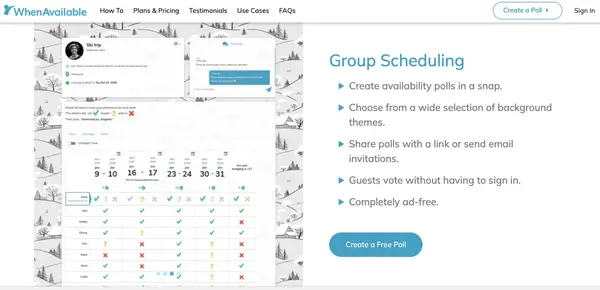
Image via WhenAvailable
WhenAvailable is one of the best group planning apps because it lets you create an availability poll in minutes. Choose from multiple background themes, then add different days and times to the poll. This works well for events such as a family reunion, board meeting, or weekend BBQs.
Key Features
- Custom Questions: Allows you to add specific questions about dietary needs or guest counts alongside time slots
- Final Day and Time Option: Lets you lock the winning option and automatically notify participants, free on every poll
- Time Zone: Displays poll times in the guest’s own time zone and the event’s time zone
- Chat Messages: Lets trip mates discuss plans with trip mates directly within the poll instead of switching to WhatsApp or email
Pros
- The free plan lets you create unlimited polls for up to 20 guests
- No sign-in required for participants
- Intuitive interface for both desktop and mobile
Cons
- Google Calendar sync and vote limits per time slot require a paid plan
- You require a paid plan to vote on behalf of guests
- Dedicated itinerary planning, trip maps, or expense splitting may require other tools
Pricing
- Basic: Free
- OneTime: $14/poll
- Premium: $49/year
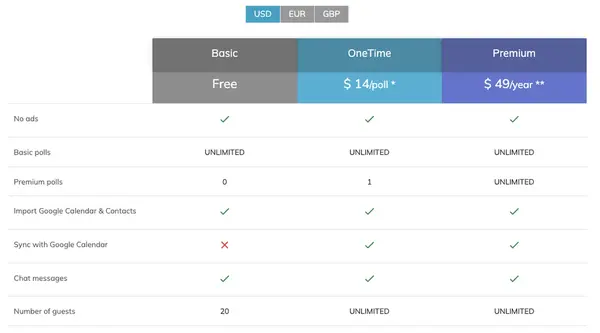
Image via WhenAvailable
Tool Level
Beginner
Usability
It’s fairly intuitive. You can create a poll, add day and time options, and share one link with the group. Participants can respond without creating an account, so there’s little setup for them.
Pro Tip: Use the WhenAvailable poll for more than just gathering availability. Add custom questions to collect details like dietary or transport needs.
2. Google Travel and AI Mode
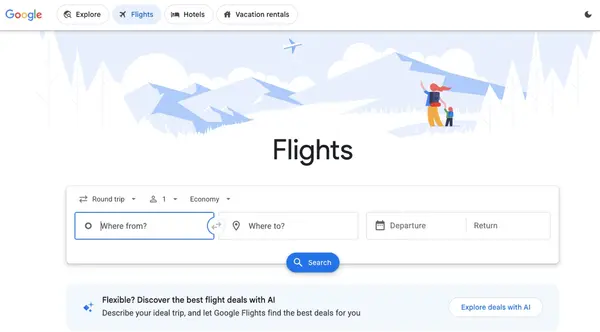
Image via Google Travel
Google Travel helps find and organize travel information like flights, hotels, and places. Canvas in AI Mode is Google's AI planning space inside Search. You can describe the trip, such as a family reunion, and Canvas drafts a plan you can share with friends.
Key Features
- Google Flights: Lets you search flights and hotels and track flight price changes
- Canvas: Creates daily itineraries with restaurants and attractions, then lets you share plans through a public link for others to customize
- Flight Insights: Shows which travel days have the best fares, alternative airports, and a price graph for fare trends
- Agentic Booking: This feature allows you to search availability and book restaurants or hotels in AI Mode
Pros
- Access AI Mode in Google Search without installing an app
- Saves research time by bringing flight, hotel, and destination information together in one place
- Simple Interface with no steep learning curve
Cons
- This tool isn’t designed for full group coordination
- AI responses may include mistakes, so travelers should verify important details
- Google currently states that booking hotels with AI Mode is available in the U.S. and doesn’t mention availability for other countries
Pricing
Google lists no price for Google Travel or Canvas in AI Mode
Tool Level
Beginner
Usability
Fairly simple for Google users. You can use AI mode in Google Search, describe your trip in natural language, and refine your plan through follow-up prompts.
Pro Tip: When using AI mode, avoid generic prompts. Include specific budget limits and negative constraints. This way you can get a tailored map of your trip and flight suggestions.
3. Wanderlog
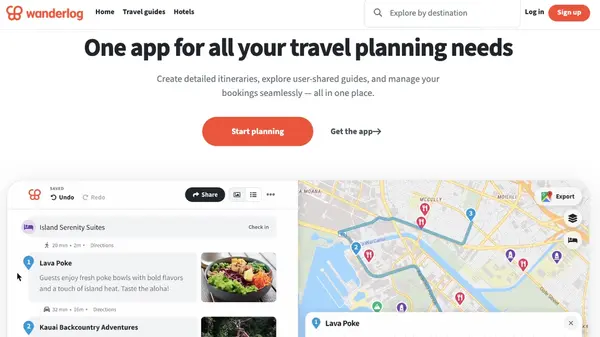
Image via Wanderlog
Wanderlog is among the best group planning apps because it gives everyone one shared itinerary and map. You won't need to switch between different tools to keep track of your travel plans. The company claims that more than eight million trips have been planned using Wanderlog.
Key Features
- Real-Time Collaboration: With live syncing and collaborative editing, you can build and edit a shared trip itinerary in real time
- Personalized Recommendations: Based on your itinerary, you can find the best places to visit
- Import Flight and Hotel Reservations: You can forward your email or connect Gmail to import them into your trip plan
- Expense Tracking: Allows you to split costs between trip mates and track your budget
Pros
- You can add unlimited places to your trip plan, such as destinations, restaurants, or hotels
- Wanderlog works for all trip types, from city breaks to multi-country group or family reunion vacations
- Get access to trip guides to discover destinations faster without starting from scratch
Cons
- Offline trip plans and route optimization are Pro Annual features
- Gmail auto-import needs Pro Annual
- Users report that the app can feel overwhelming with a lengthy onboarding flow
Pricing
- Freemium: Free
- Pro Annual: Starts at $39.99/year
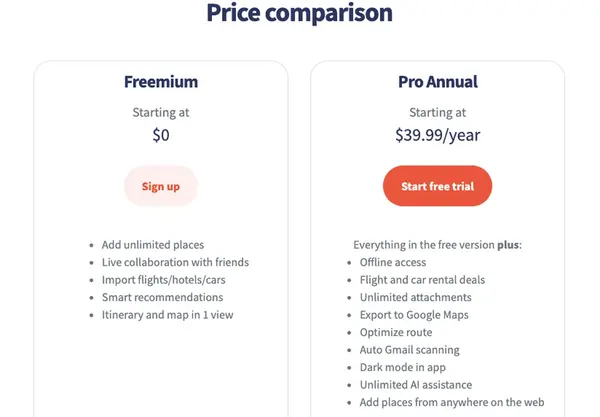
Image via Wanderlog
Tool Level
Intermediate
Usability
Wanderlog has an intuitive interface. You can build itineraries with maps and drag-and-drop features. However, beginners might face a slight learning curve because the app has many planning features.
Pro Tip: Ask trip mates to add their must-visit places first. Then build the itinerary around the locations everyone wants to include.
Also Read:
4. TripIt
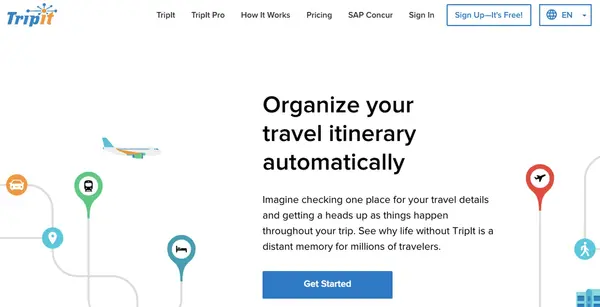
Image via TripIt
TripIt is a group travel planning app for organizing travel details into one itinerary after bookings are made. These travel details can include flight or hotel bookings. TripIt is trusted by 22+ million users and claims to have helped create 214+ million itineraries.
Key Features
- Inbox sync: Automatically scans a linked email for travel emails to build itineraries
- Risk Alerts: Get notified about potential disruptions, like inclement weather or airline strikes
- Inner Circle: Lets you share your upcoming or new trip with a select group
- Navigator: Shows transportation options for getting from one place to another
Pros
- Share your trips via links or social media for people to view them
- Access your TripIt itineraries offline
- Sensitive personal information is encrypted and restricted by passcode on your mobile device in case it’s lost or stolen
Cons
- You can only upload three documents per trip on the free plan
- Risk Alerts and Inner Circle need Pro
- Inner Circle invitees must sign in to their own account to finalize accepting the invitation
Pricing
- TripIt: Free
- TripIt Pro: $49/year
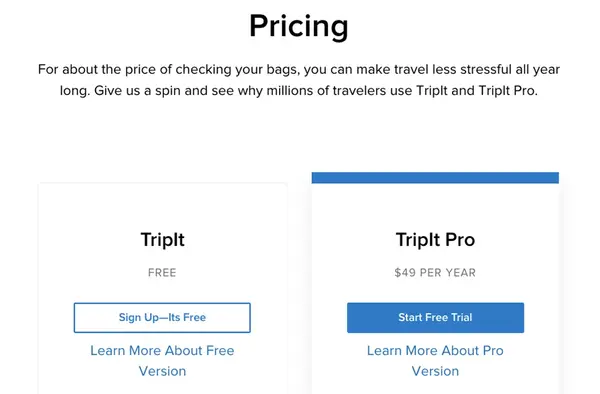
Image via TripIt
Tool Level
Beginner to intermediate
Usability
Users praise the ease of use and ability to organize trips in one place. However, the platform’s bugs can cause double hotel bookings.
Pro Tip: Forward the group's booking emails to plans@tripit.com from your linked address. TripIt creates the itinerary, and you can share the trip link with others.
5. Splitwise

Image via Splitwise
Splitwise helps keep track of expenses and balances when planning a meeting with multiple people. Managing shared costs can be a tricky part of group trips. This is because multiple people may cover different costs, making it easy to lose track of who owes what. Splitwise keeps these shared costs organized in one place.
Key Features
- Expense Splitting: Split costs equally, by percentage, shares, or exact amounts
- Currency Conversion: Convert expenses to your default currency using current market rates
- Receipt Scanning: Scan receipts to create expenses and itemize individual costs
- Payment Integrations: Settle balances through PayPal or Venmo
Pros
- Splitwise works across iOS, Android, and web
- Log expenses in 100+ currencies, handy for trips abroad
- Splitwise is available in more than seven languages for international users to navigate the app
Cons
- Receipt scanning and currency conversion need Pro
- The ad-free experience requires Pro
- Friends need an account to see balances
Pricing
Splitwise's site shows no Pro price
Tool Level
Intermediate
Usability
The interface is intuitive for beginners to start tracking expenses. However, G2 reviews mention difficulty linking to existing financial software.
Pro Tip: Turn on Simplify Debts when several people owe each other money. Splitwise can redirect payment information directly between group members.
Also Read:
6. Roadtrippers
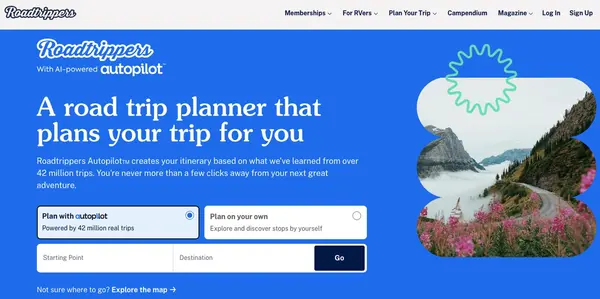
Image via Roadtrippers
Roadtrippers is among the best group planning apps for road trips. Enter your start and end points, and the app maps out your route while suggesting stops along the way.
Key Features
- Multi-Stop Routes: Add up to 150 stops and discover places along your route.
- Roadtrippers Autopilot: Builds itineraries using insights from over 42 million trips
- Offline Maps: Download maps to your mobile devices and use them when you don't have service
- Trip Collaboration: Lets travel companions review, edit, and add waypoints to a shared trip
Pros
- Browse 50,000+ campgrounds with Campendium reviews
- US gas cost estimator helps groups budget for fuel
- Get a seven-day free trial for the Roadtrippers Premium plan
Cons
- Free plan includes only one saved trip and three stops
- Every trip collaborator needs a free account
- The Trip Collaboration feature is only available on +Pro and +Premium
Pricing
- Free
- +Basic: $11.99/month
- +Pro: $16.99/month
- +Premium: $19.99/month
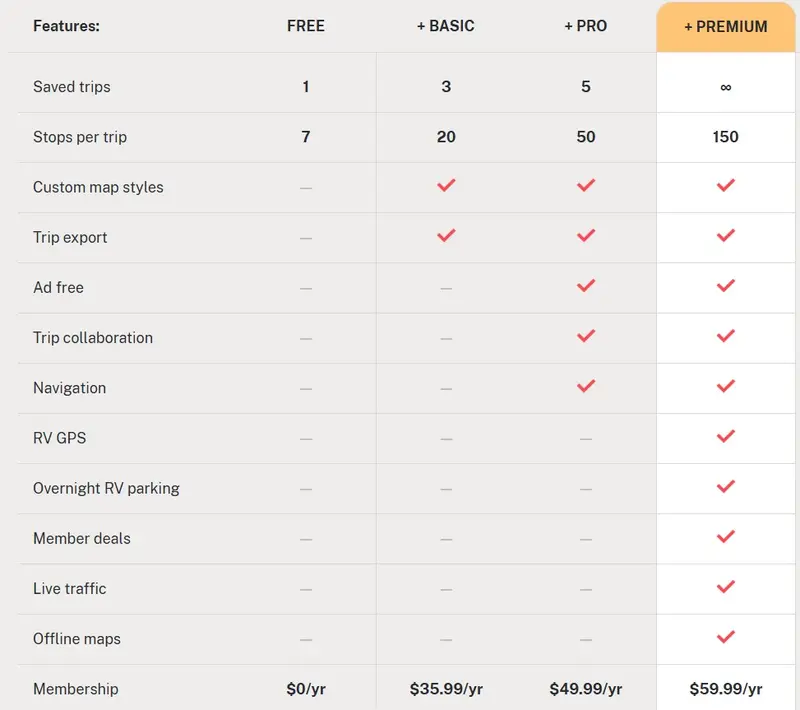
Image via Roadtrippers
Tool Level
Beginner to intermediate
Usability
Roadtrippers gives you a map-based view of your trip, with stops along the route. Adding stops is straightforward. However, some users may find customizing trips harder to navigate.
Pro Tip: Use Autopilot to enhance your trip. It can suggest restaurants, activities, and places to stay based on your route and preferences.
7. PackPoint
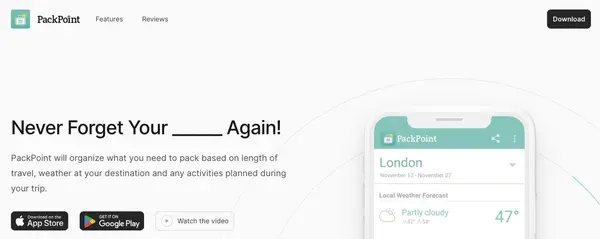
Image via PackPoint
PackPoint is on the list of best group planning apps because it helps you organize your packing based on the destination or weather. PackPoint states that there are over two million packing lists created with the app.
Key Features
- Packing Lists: Builds lists based on your trip length, destination weather, and planned activities
- Share Your Packing List: PackPoint lets you share your packing list with fellow travelers so they know what to pack
- Connect to TripIt: Automatically creates packing lists from your TripIt trips
- Customize PackPoint: You can add your own activities and packing list items
Pros
- Removes the guesswork from packing, especially for trips to unfamiliar climates
- Runs on iPhone, Android, Mac, and Apple Vision Pro
- Factors in business or leisure travel and international-trip needs
Cons
- Sharing lists needs Premium
- PackPoint last updated its iOS app in September 2023
- TripIt sync is paid
Pricing
The App Store mentions PackPoint has a free option. PackPoint doesn't list any official paid pricing plan on its website.
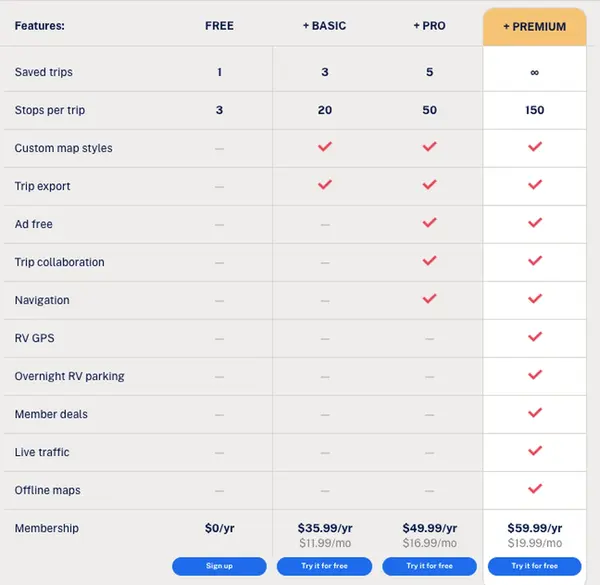
Image via PackPoint
Tool Level
Beginner
Usability
The app is intuitive and effectively suggests items for your packing list. Beginners won't face a steep learning curve.
Pro Tip: Review PackPoint’s suggested list before packing and remove items you already have or don’t need.
|
What Are the Seven Best Group Planning Apps to Consider? The seven group planning apps are WhenAvailable, Google Travel and AI Mode, Wanderlog, TripIt, Splitwise, Roadtrippers, and PackPoint. They cover different needs, from group scheduling and trip planning to expenses and packing. Each app handles a specific part of the planning process. |
Also Read:
How Do You Get Your Group to Agree on a Day & Time?
Create an availability poll that includes day and time options. Start with around three or five options and send one poll link. Include a reply-by day then pick the day with the winning votes before you start planning the rest of the trip. You can use group planning apps such as WhenAvailable to automate this process.
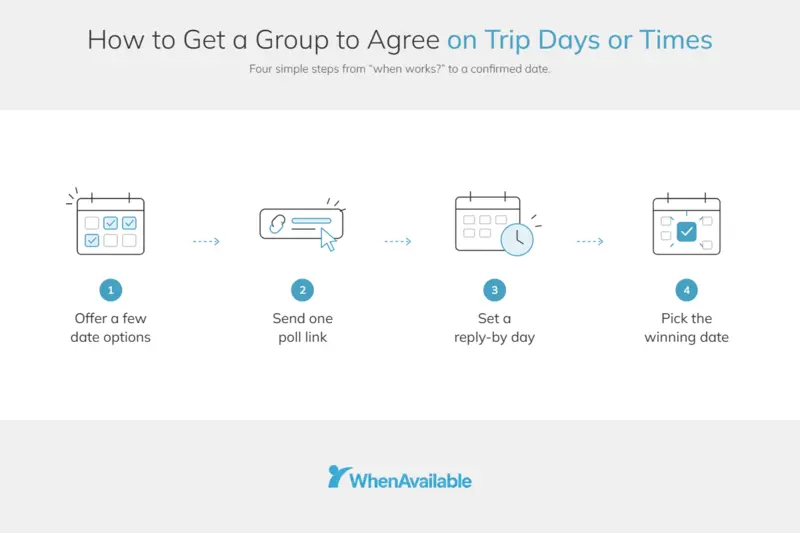
- Narrow the Window: Offer around three to five options instead of asking, "when's everyone free?" You can add options or remove them later with tools like WhenAvailable.
- Send One Poll Link: Guests vote Yes/No/Maybe without an account. Share the link where the group already chats, such as on WhatsApp or email.
- Set a Reply-By Day: Specify when the poll closes. This gives you a clear point to review the responses and choose an option.
- Confirm the Choice: Choose the Pick as Final option, which is free on every poll created by WhenAvailable, and email all guests. Then start drafting the trip plan.
|
How Can You Find the Best Time When Planning a Group Trip? Suggest a few possible days and times instead of asking when everyone is free. Use one poll to collect responses, set a reply deadline, and confirm the chosen timing. |
Also Read:
- How to Find a Meeting Time that Works for Everyone
- Best Interview Scheduling Tools for Faster Hiring
FAQ
1. What’s a good app for group planning?
The right group planning app depends on what you need to organize. Use WhenAvailable to gather availability and Wanderlog to build a shared itinerary. You can consider planning apps like TripIt to help organize bookings and Splitwise to track shared costs.
2. Is there an app to organize a group trip?
Yes. The right group planning app depends on how you’re traveling and what you need to organize. TripIt can organize bookings for a fly-in trip, while Wanderlog supports shared trip planning. For road trips, Roadtrippers can map your route and stops.
3. Is TripIt or Wanderlog better for group trips?
It depends on what you need to manage. TripIt focuses on organizing bookings and travel details into one itinerary. Wanderlog supports shared planning, itinerary building, and budget management.
4. What’s the best free group trip planning app?
WhenAvailable's free plan lets everyone vote on the best day and time for a trip without signing up for an account. Wanderlog's free plan covers collaboration and maps, while Splitwise's free cap is four expenses a day. Google lists no price for its travel or AI tools.
5. Is Wanderlog actually free?
Yes. Wanderlog's free plan covers building a shared itinerary and mapping your stops. However, offline trip plans, route optimization, and Gmail auto-import are Pro features. Wanderlog doesn't publish its Pro price on the website.
6. Can AI plan a group trip?
Yes, AI can help with parts of group trip planning, such as creating an itinerary. Start by using group planning apps like WhenAvailable to agree on the trip day and time. Then, Google’s Canvas in AI Mode can build a day-by-day itinerary with restaurants and attractions. You can share the plan by public link so friends can customize it.
7. Can WhenAvailable help you plan a group trip?
Yes. The organizer can create a poll with day and time options and share a link. Everyone votes on the time that works best for them. You can also add custom questions to ask about destinations, restaurants, or activities.
8. Do group trip planning apps work offline?
Some group trip planning apps let you access saved trip details without an internet connection. However, offline access varies by group planning app and may depend on your plan. For example, Wanderlog lists offline trip plans as a Pro feature. Roadtrippers includes offline maps with Premium on mobile.
Also Read:
Best Group Planning Apps: What Are the Key Takeaways?
Group planning apps help coordinate availability, plan itineraries, manage bookings, split expenses, map routes, or prepare packing lists.
The best group planning apps covered in this guide are WhenAvailable, Google Travel and AI Mode, and Wanderlog. We also included TripIt, Splitwise, Roadtrippers, and PackPoint.
Choose group planning apps based on the planning task, such as group scheduling or finding destination ideas. Consider your group size and trip type, for example, whether you’re planning a fly-in or road trip. You may also need more than one app to handle the full planning process. Start free, and when you need more from your polls, see WhenAvailable's plans and pricing.